Exciting! The TychoMission is taking part in ESA’s #Moonlight call-for-ideas enabling use cases on the #Moon with a lunar communications & navigation service (LCNS). What do you think about our #space #lasercomms supporting crewed exploration from everywhere http://tiny.cc/tycho4moonlight?
Hello everyone ! My name is Mario Robert D’Ambrosio and I got selected for GSoC 21 with the University of Barcelona to work on the MOLTO-3BP and MOLTO-IT tracks. During these weeks I had the pleasure to work with multiple mentors, Brandon Escamilla (brandon.escamilla@outlook.com) and Ginés Salar (100345764@alumnos.uc3m.es) Our goals commitments were multiple: first and foremost to have an integrated working and refactored repository for the MOLTO-3BP (Refactor Github Link)
And to be able to yield a dynamic, yet simple frontend to consume for the University Carlos III (located in Madrid) students and whoever interested in understanding the dynamic amongst translunar orbits and trajectories.
This is why I worked closely with Brandon and Gines, both in charge respectively of mantaining the service accessible on the university’s server (Brandon) for the MOLTO-IT-API operations and the MOLTO-3BP (Gines).
Secondily, we decided also to focus on revamping the UI of the displayed results and moslty to encapsulate all the brilliant work done by Gines for his thesis into OOP modern factory pattern classes. I chose a microservice approach, as a busy python programmer, I decided to go towards this route as microservices communications is easier to manage and mostly, it is the most prominent way to micro-architect projects in the 2021 dev era.
Work Roadmap
1. Cleaning up the MOLTO-3BP Repository
First and foremost a cleanup of old files and unused files was done.
I cleaned nearly 30 files and removed many unused pieces of code
The running options were added as a runner in the python file and as static file Also, clearly, a README was put to explain all the different layers of inputs.
4. Changing Image Layout
I have changed the layout in various sessions and offered custom plot graphic display
5. Adding multiprocessing
Multiprocessing support for server and scalable core split was also added
6. Adding Flask Support
Finally, to consume the results as QUEUE and display the image with an interrogation system by JOB ID a Flask support was mandatory and added. This would allow to consume the API and have the results ready asynchronously by calling with JOB ID
7. Adding S3 resource saving support
I have added S3 Bucket support not to bloat the server and consume credits I’ve won on my AWS account in order to display the image results of plots continuously for students.
As for the MOLTO-IT we would definitely like to expand and change some things.
Especially we would need to migrate the API to FastAPI to provide more flexibility and maintanance on the long run for the functions and portability.
Also genetic algorithm population and generations could be bettered calibrated to run in a case-specific solution scenario instead of just a plain global one.
This is going to be done by September – October 21 and could be finished in a new GSoC edition.
MAKING THE MOLTO-IT STATIC
It would be nice to dockerize and make the Molto IT static and folder/system agnostic, instead of having many code blocks hardcode as such
Lissajous Orbit
We also plan to work on the Lissajous orbit, which requires most of the computation, as it represents both a blend of the Lyapunov and Halo computations combined. This is planned to be done by November – December 21.
Conclusion
I have learned so much from such experience, I would be capable of writing an essay for the enormous tasks learnt throughout such experience.
First, communication was essential for the deployment and delivery of the project. Second, I learned about pacing myself and downplaying my expectations as to aiming high but delivering less is worse than aiming a bit lower and overdelivering.
I tried to aim at a not so fantasmagoric intention but have a GSoC plan and post GSoC plan. My intentions were to being able to mantain and bring to life a repository where anyone could possibly contribute and deploy new open source code.
As a Computer Engineer student, I have always shared a great passion for computer engineering problems and as an aerospace passionate, I enjoy amusing myself with astrophotography and amateur telescope obsevations. To close the GSoC 21 edition, I went and made my first ascent to the Corno Grande of Italy (https://en.wikipedia.org/wiki/Corno_Grande), where I went to the astronomical observatory and made a night climb to the peak (2912m) to challenge myself and close the GSoC edition with a bit of salt (and pepper! as this is not an easy hike/climb, experts only advised!).
I am grateful to have joined this GSoC edition and to be able to contribute in the future!
The goal of this project is to develop a failure detection, isolation and recovery algorithm (FDIR) for a cubesat, but using machine learning and neural networks instead of the more traditional methods.
Motivation: What is an FDIR algorithm and why is it usefull?
One of the most challenging parts of space missions is knowing and controlling where your spacecraft is, what is its relative orientation with respect to earth and how it is moving. Being aware of these three things is crucial to know if your spacecraft is flying too high or too low, too close to other spacecrafts, or simply if its oriented in a way that will allow it expose its solar panels to the sun to produce power or to point its antenna down to earth for calling home.
To perform this crucial task of computing and controlling its position and orientation spacecraft are designed with a variety of sensors and actuators that, together with proper control algorithms, ensure that your satellite remains where you want it and pointing in the right direction. This is often referred to as Attitude and Orbit control subsystem or AOCS.
Since this subsystem is critical for the spacecraft, it is needless to say that a failure in one of these sensors or actuators could easily kill your spacecraft and put and end to your mission. A faulty reading of a gyroscope that says that your spacecraft is rotating when it is not, a dead gyroscope that gives no signal and can’t tell if it is, or just a faulty thruster that provided more thrust than it should could leave your spacecraft spinning uncontrolled.
For these reason, providing the spacecraft on board software with a way of detecting these kind of failures as well as guidelines on how to proceed if one of these failures is detected is crucial for any space mission. This is done by means of the so called Failure Detection, Isolation and Recovery algorithms (FDIR).
Traditionally, these types of algorithms where simple, as they where based mainly on hardware redundancy , i.e., having many sensors that measure the same thing so that if one fails, you could detect the failure by looking at the rest and seeing that the signal is not consistent, isolate the failure by ignoring the reading from that sensor, and recover from the failure simply by continue to listen to the rest non-faulty sensors. While this is a valid and robust strategy to FDIR, it requires hardware redundancy of many spacecraft sensors and actuators, which means carrying on board more gyroscopes or reaction wheels than you actually need.
In recent years however, there has been a rising interest in low-cost space platforms such as Cubesats, pico or nano satellites that perform missions with much smaller budgets. One of the strategies used in these missions to reduce costs is to replace hardware based functionalities by software based ones, reducing therefore the number of components on board, the weight and power demands and overall complexity.
Replacing a hardware redundancy based FDIR strategy with a software based strategy is a perfect example of this. If your on board computer is capable of detecting a drift or a bias in the measurement of a sensor and correcting it without the need of comparing it with redundant sensors, or comparing it with the smallest number of redundant sensors possible then your mission might still be capable of safe operation, but minimizing the weight, power and cost penalties of hardware redundancy. There many ways to perform FDIR algorithms that focus on software instead of hardware, in order to explore some of the less conventional ones, it was decided to focus the project around machine learning and neural networks.
Project description
The goal of the project was then to set the basis of a neural network that could work to detect possible faulty signals from a cubestas sensors and actuators during its operation. This project had then two distinct lines of work:
To develop or modify an existing simulator of a Cubesat to generate and extract the data from the sensors and actuators. This data is needed to train and test the Neural Network.
To create an script capable reading and preprocessing the data from the simulator as well as creating, training and testing the neural network.
For the first, task an existing Cubesat simulator that included its own FDIR algorithm was used. This simulator written by Javier Sanz Lobo using Simulink included among its features the ability to simulate not only the cubesats motion, but also the readings from gyroscopes, reaction wheels and thrusters, as well as the capacity to induce artificial failures on the different components during the simulation. The original simulator can be found linked in the following repository:
Several modifications where made to this simulator in order to fit it to it’s desired purpose. Among these it is worth highlihting:
The ability to Change the initial conditions to randomly generated ones within a desired range
A Matlab code that ran the simulator in a loop with random failure scenarios to generate the training and testing data
The capacity to export the readings from the sensors and actuators during the simulation to .txt files with the desired format.
Disabling the FDIR algorithm so that the simulated readings of the artificial failures remained unchanged.
The capacity of failures to occur at different times rather than at the start of the simulation.
For the second line of work, a scrip was written from scratch in python 3.8 using keras from the TensorFlow library to build, train and test the neural network. At the day of publishing this post, there are currently two scripts that read the data from 6 gyroscopes and 4 reaction wheels of the cubesat in the simulator and use one thousand simulations to train a Neural Network and a convolutional neural network. In both cases the network is then tested with another one hundred simulations to evaluate its real accuracy.
The end result is two types of neural networks that are both capable of predicting not only the most likely failure scenario that corresponds to that data, but also the probability of each individual failure scenario, which is a valuable input for future steps in the process of developing a fully functional FDIR algorithm.
Results
Currently both the traditional neural network and the convolutional one achieve accuracy values of around 70% in their predictions. Note that with 6 gyros and 4 Reaction wheels and the limitation of a maximum of two gyros and two reaction wheels failing the number of possible scenarios rises up to 242, which makes it hard to perform predictions.
Simpler scenarios where none of the devices fail are easily identified by both networks, as is the case of the following figure where both predict the correct outcome with a probability higher than 70%:
More complex scenarios where one or several devices fail reduce this prediction probability, making them capable of predicting correctly the failure of one device, but rarely all of them. In this cases, however, usefull information is provided by the probabilities, as the correct scenario can be found among those with the highest probabilities even if it is not the one with the highest.
Take for example the case depicted in the following figure where only one reaction wheel fails. The CNN is capable of predicting the correct scenario, but the NN predicts a scenario in which not only the aforementioned wheel fails, but also two complementary gyros as well. Note that even when predicting the wrong scenario, the NN shows the correct one as the second most likely.
Future work
A lot has been achieved during this GSoC period, yet there is still plenty of work ahead in this ambitious project. Among the features that are still to be implemented and tasks to be performed there are:
Continue to improve the neural networks to achieve better results at higher computational efficiencies.
Improve the simulator to generate better failure scenarios for thrusters.
Expand the FDIR capabilities of the network to include the simulated values of thrusters.
Research on reducing the number of input arguments to reduce the order of the problem and increase efficiency.
An interface between simulator and neural network to test and simulate in parallel.
„signal“ object contains information about the signal file, such as name, center frequency and time of record. For now, there is only „type“: „NOAA“ is supported, if the signal is not NOAA then you should put „type“: null or simply remove that key.
„tle“ object contains the two lines of the „two-line element“ file of the satellite that the signal comes from.
„station“ object contains the information of the station, such as name, longitude (degree), latitude (degree) and altitude (meter).
„default_channel“ object contains a list of channels that will be analyzed in case there is no channel input from the command line. It could handle more than one channel, you can always add more channels into that list, for example:
NOTE: „tle“ and „station“ objects are only needed if you intend to use signal center frequency prediction based on TLE, „default_channel“ object is only needed if you want to not put channel information into the command line, otherwise you can remove them.
Step 2: Run the program from the Command-Line Interface (CLI)
Simply use Python to run the file main.py with the following arguments:
-f (required): to input the directory of the wave file.
-i (required): to input the json signal information file.
-o: directory and name without extension of the wanted output file, defaults to „./output“.
-ch0, -ch1, -ch2, -ch3: to input the frequencies (in Hz) of up to 4 channels to be analyzed. Will overwrite the „default_channel“ provided by the json file.
-bw0, -bw1, -bw2, -bw3: to input the bandwidth (in Hz) of up to 4 channels to be analyzed. Will overwrite the „default_channel“ provided by the json file.
-step: to input the length in time (in second) of each time interval, defaults to 1.
-sen: to input the sensitivity, which is the width of each bin in the frequency kernel (in Hz) after FFT, defaults to 1.
-filter: to input the strength of the noise filter as ratio to 1. For example, filter of 1.1 means the noise filter is 1.1 times as strong, or 10% stronger than the default filter, defaults to 1.
-begin: to input the time of begin of the segment to be analyzed, defaults to 1.
-end: to input the time of end of the segment to be analyzed, defaults to the end of the file.
-tle: used to turn on prediction based on Two-line elements (TLE) file, otherwise this function is off.
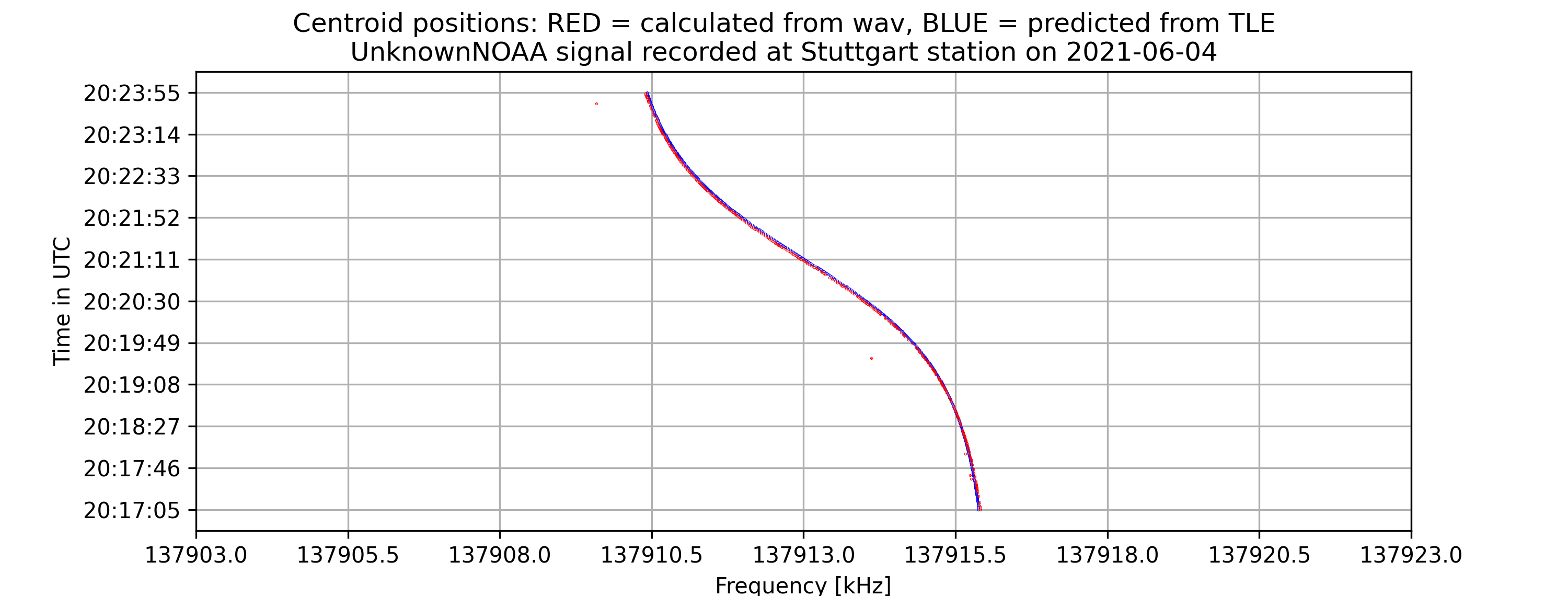
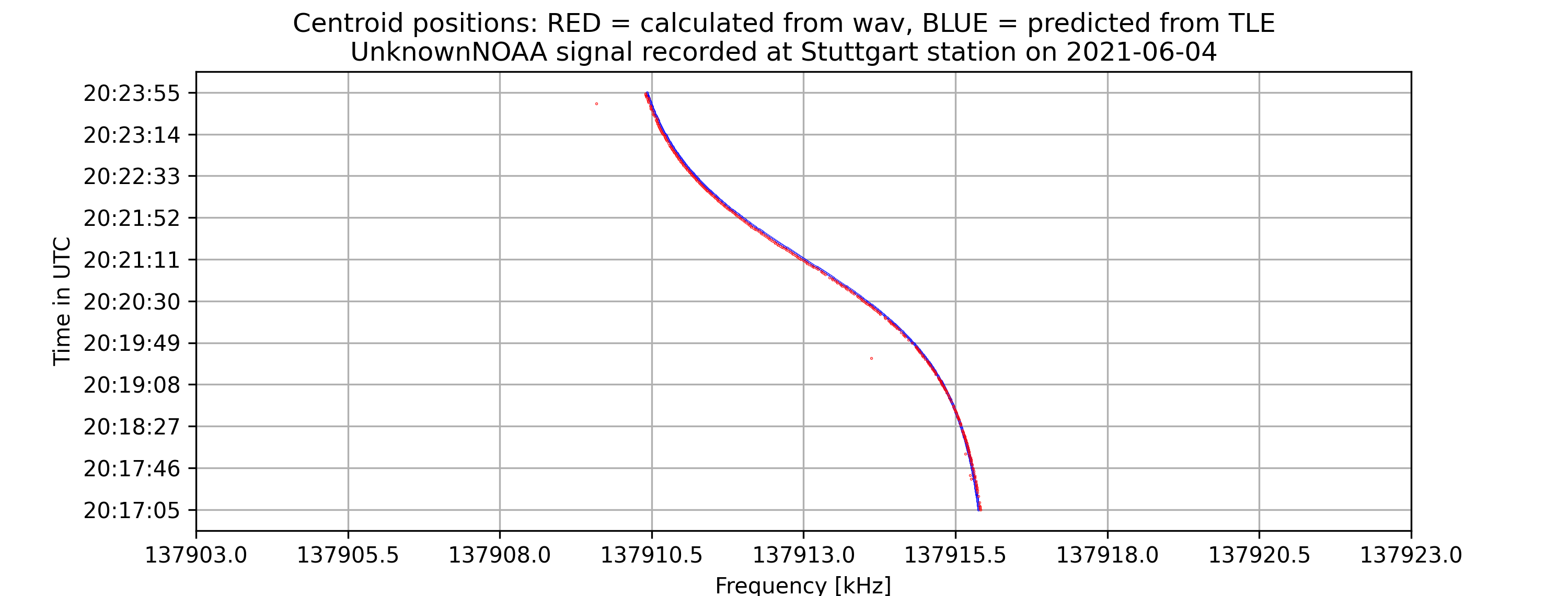
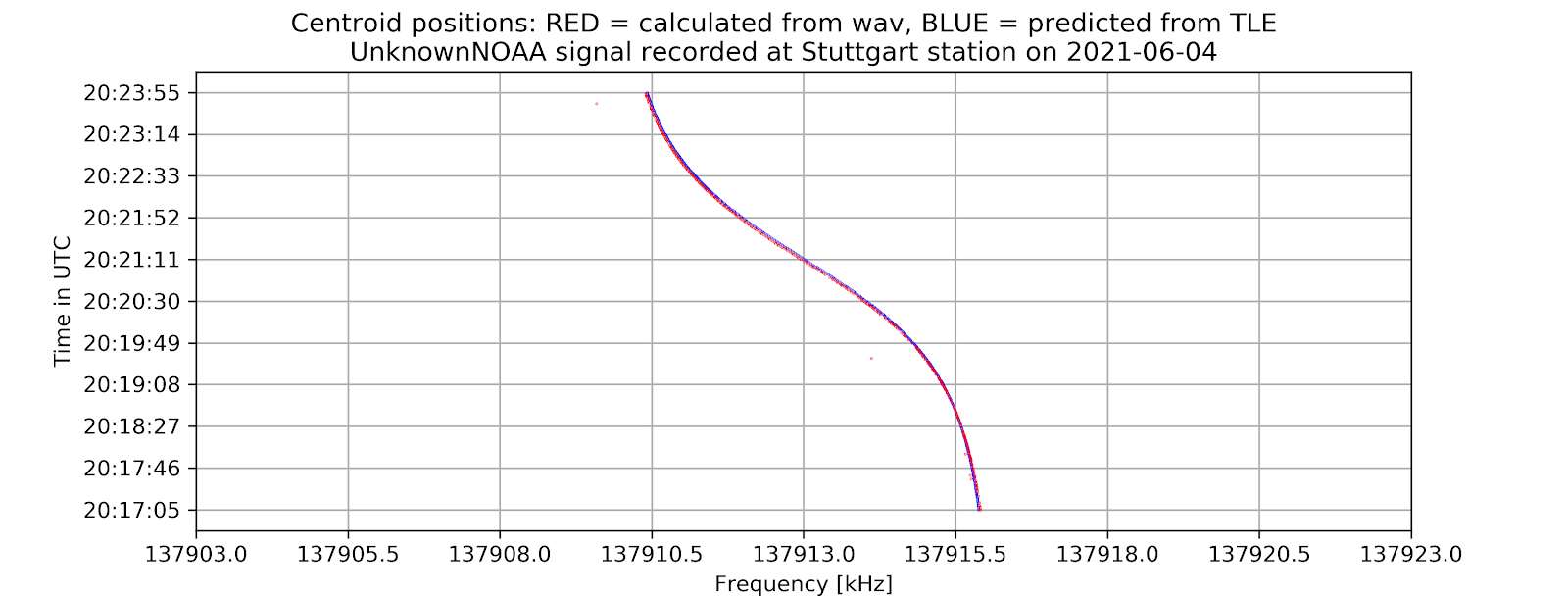
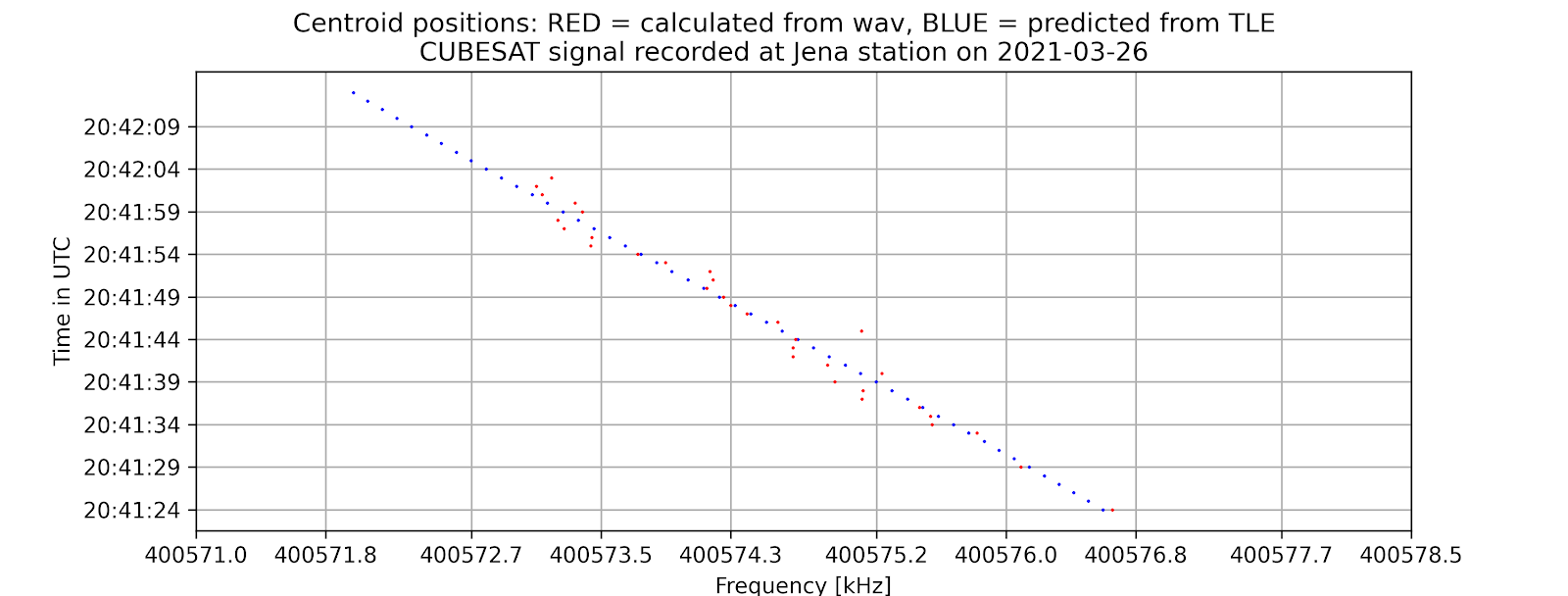
A time vs. frequency graph, showing the center of the signal in the frequency domain by time, for example:
A .csv file storing the center position in the frequency domain by time.
A .json file with a „header“ object containing metadata of the signal and „signal_center“ object containing centers of the signal for each channel by time.
On the command-line interface, if -tle is enabled, there will be information about the offset between the calculated frequencies from the wave file and from the tle file as well as the standard error of the signal compared to prediction.
All files are exported with name and directory as selected with the [-o] argument.
Because of the recent sharp growth of the satellite industry, it is necessary to have free, accessible, open-source software to analyze satellite signals and track them. In order to achieve that, as one of the most essential steps, those applications must calculate the exact centers of the input satellite signals in the frequency domain. My project is initiated to accommodate this requirement. It aims to provide a program that can reliably detect satellite signals and find their exact frequency centers with high precision, thus providing important statistics for signal analyzing and satellite tracking.
2. Overview
The project aims to locate the exact centers of given satellite signals with the desired accuracy of 1kHz, based on several different methods of finding the center. At first, the center-of-mass approach will be used to determine the rough location of the center. From that location, more algorithms will be applied depending on the type of the signal to find the signal center with higher accuracy. Currently, for many APT/NOAA signals, with the center-of-mass and “signal peak finding” approach (that will be shown below), we can get results with standard errors less than 1 kHz. For example, with the example signal above, the standard error is 0.026 kHz.
3. Theoretical basis
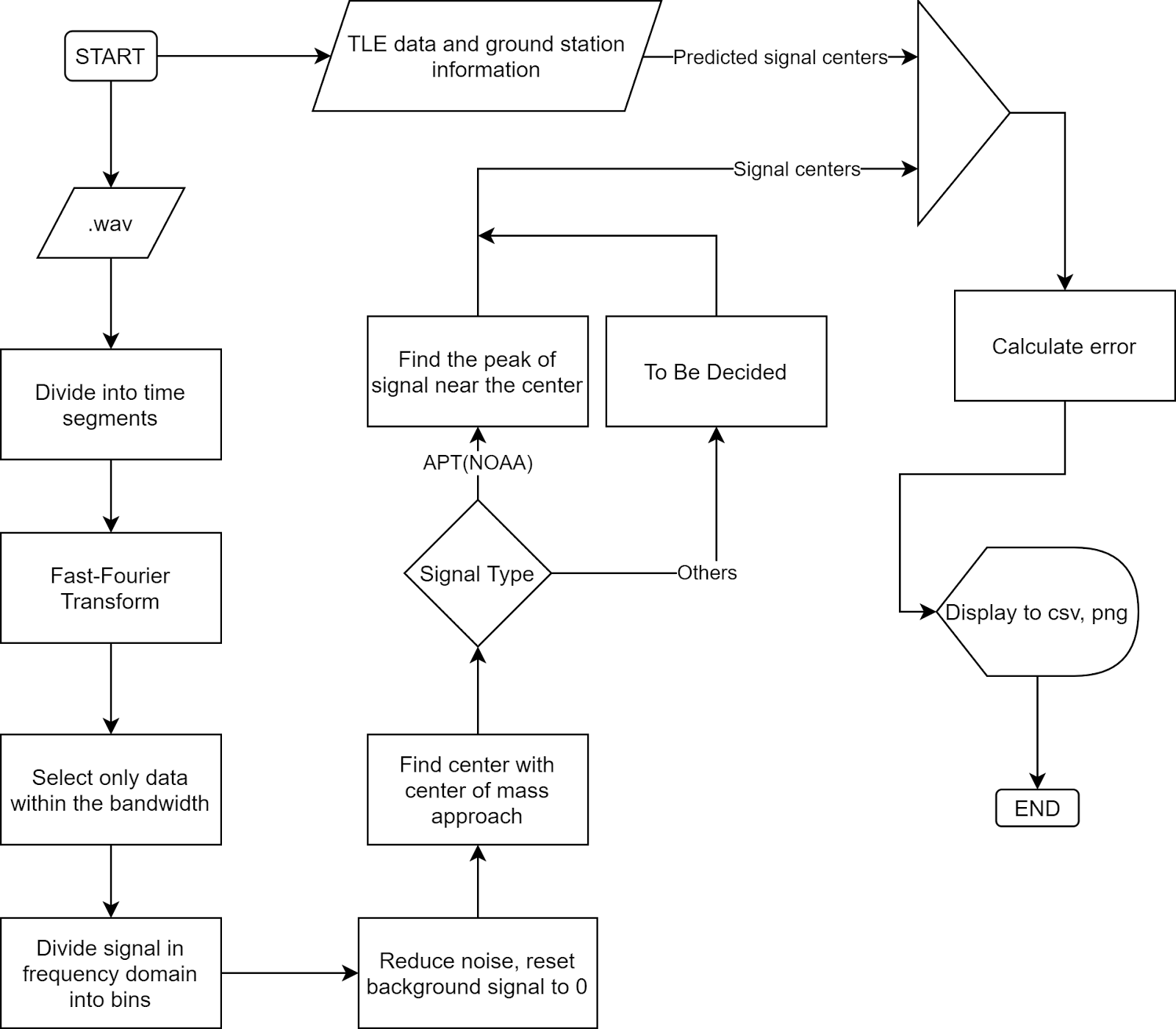
The overall flowchart:
Fast-Fourier Transform (FFT)
Fourier Transform is a well-known algorithm to transform a signal from the time domain into the frequency domain. It extracts all the frequencies and their contributions to the total actual signal. More information could be found at Wikipedia: Discrete Fourier transform.
Fast-Fourier Transform is Fourier Transform but uses intelligent ways to reduce the time complexity, thus reducing the time it takes to transform the signal.
Noise reduction and background signal reset:
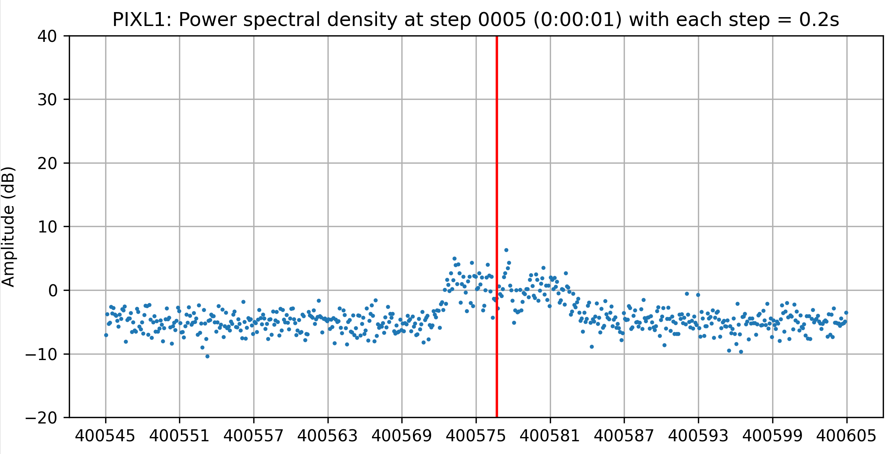
In actual signals, there is always noise, but generally noise has two important characteristics, which is normally distributed and its amplitude does not change much by frequency. You can see the signal noise in the following figure:
If we can divide the signal in the frequency domain into many parts such that we are sure that at least one of them contains only noise, we can use that part to determine the strength of noise.
For example, consider only this signal segment:
By taking its average, we can find where the noise is located relative to the amplitude 0. By subtracting the whole signal to this average, we can ensure the noise all lies around the zero amplitude.
Next, we want to reduce all the noise to zero. To do that, we consider the distribution of noise, which is a normal distribution.
From this distribution, we are sure that 99.9% of noise has amplitude less than three times of the standard deviation of noise. If we shift the whole signal down by 3 times this standard deviation, 99.9% of the noise will have amplitude less than 0. From there, we can just remove every part of the signal with an amplitude less than zero. Then we will be able to get a signal without noise with the background having been reset to 0.
You can clearly see the effect of this algorithm by looking at the signal of PIXL1 satellite above, where all the noise has been shifted to below 0.
Center-of-mass centering
This algorithm is simple, the centroid position is calculated as: (sum of (amplitude x position)) / (sum of amplitude), similar to how we calculate the center of mass in physics. The result of this algorithm is called the spectral centroid, more information could be found at Wikipedia: Spectral centroid.
Peak finding.
For signals with clear peaks such as APT(NOAA), finding the exact central peak points of the signal would give us good results. From the rough location of the center by Center-of-mass method, we can scan for its neighbor to find the maximum peak. This peak will be the center of the signal that we want to find. For APT signals, this peak is very narrow, therefore this method is able to give us very high precision.
Predicted signal centers from TLE
TLE (Two-line element set) information of a satellite can be used to determine the position and velocity of that satellite on the orbit. By using this data of position and velocity, we can calculate the relativistic Doppler effect caused by the location and movement of the satellite to calculate the signal frequency that we expect to receive on the ground. For more information, visit Wikipedia: Relativistic Doppler effect.
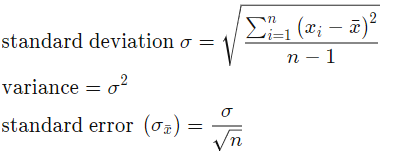
Error calculation. Assume TLE gives us the correct result of signal center, we can calculate the standard error of the result by calculating the standard deviation:
Where n is the number of samples, x_i is the difference between our calculated center frequency from .wav and the frequency we get from TLE.
4. Implementation in actual code:
main.py is where initial parameters are stored. The program is executed when this file is run.
tracker.py stores the Signal object, which is the python object that stores every information about a signal and the functions to find its center.
tools.py contains the functions necessary for our calculation, as well as the TLE object used for center prediction.
signal_io.py stores functions and objects related to the input and output of our signals and instructions.
5. Current results:
For APT(NOAA): Standard error = 0.004 kHz
For PIXL1(CUBESAT): Standard error = 0.029 kHz
6. Potential further improvements:
Expand the program to work better with more types of signals.
Make video-output function works with reasonable computing resources. Currently, with my private version of the code, I am able to make videos such as this one, but it took too much time and memory to actually make one, therefore I did not put it into the official code.
CalibrateSDR developed by Andreas Hornig, is a tool developed to determine the frequency drift of Software Defined Radios precisely using sync pulses of various Signal Standards.
Cheaper SDRs use a low-quality crystal oscillator which usually has a large offset from the ideal frequency. Furthermore, that frequency offset will change as the dongle warms up or as the ambient temperature changes. The result is that any signals received will not be at the correct frequency, and they would drift as the temperature changes. CalibrateSDR can be used with almost any SDR to determine the frequency offset.
The work on GSM (2G) has been done by Jayaraj J, mentored by Andreas Hornig, as part of Google Summer of Code 2021, the working directory for the same can be found at Github.
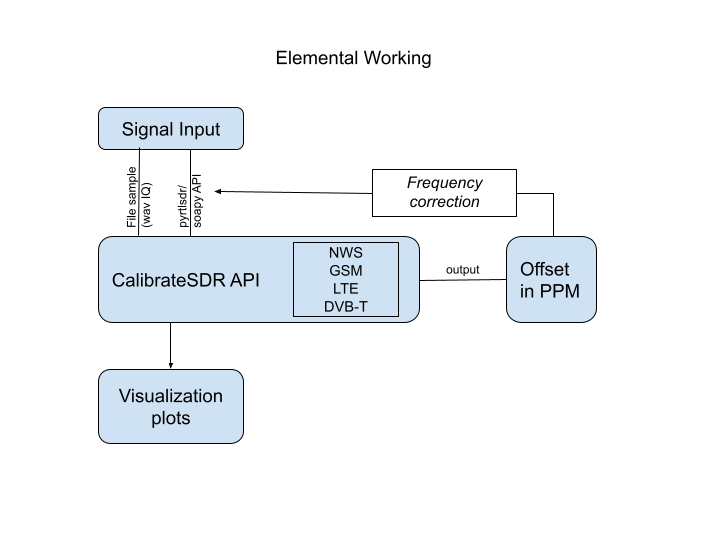
proposed working of CalibrateSDR – made GSM signal compatible (the below guide shows how to get started)
Project Description
GSM uses time division to share a frequency channel among users. Each frequency is divided into blocks of time that are known as time-slots. 8 time-slots are numbers TS0 – TS7. Each time slot lasts about 576.9 μs. The bit rate is 270.833 kb/s, a total of 156.25 bits can be transmitted in each slot.
Each slot allocates 8.25 of its „bits time“ as guard-time, split between the beginning and the end of each time slot. Data transmitted within each time slot is called a burst. There are several types of bursts.
Frequency correction burst is a burst of a pure frequency tone at 1/4th the bitrate of GSM or (1625000 / 6) / 4 = 67708.3 Hz. By searching a channel for this pure tone, we can determine its clock offset by determining how far away from 67708.3Hz the received frequency is.
How is it working?
Scanning of GSM Channels is based on the ARFCN frequency bands. For tuning into GSM Frequency, the ARFCN script can be used. We give the input of band to scan, the result will be the frequency. If we input the „scan all“ option, it will scan the whole GSM Frequencies in the given band and return the offset calculated from each frequencies. The code for the same can be found at: https://github.com/aerospaceresearch/CalibrateSDR/blob/jyrj_dev/calibratesdr/gsm/arfcn_freq.py
After scanning channels in specific bands using ARFCN, the program will record the sample in the given sample rate. Make sure the SDR is connected with the device, or we can record it and give the input as a wave file.
The determination of the position of FCCH bursts that we receive in SDRs is done by the code in fcch_ossfet.py. We measure it by how much shifted is the FCCH burst, than what we expect, that is at 67708.3 Hz from the frequency centre. Simply, if no offset is there, we could see these tone bursts at 67708.3 Hz offset concerning the centre frequency of the channel.
The final output we receive include
Frequency drift from the expected FCCH position
The Offset of SDR in PPM
The whole code works from the main cali.py and inturnsgsm.py files
To test with the IQ_file.wave:
After cloning the repo locally, run the setup to install the requirements using the command: python setup.py install
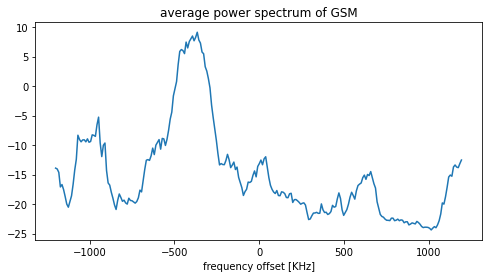
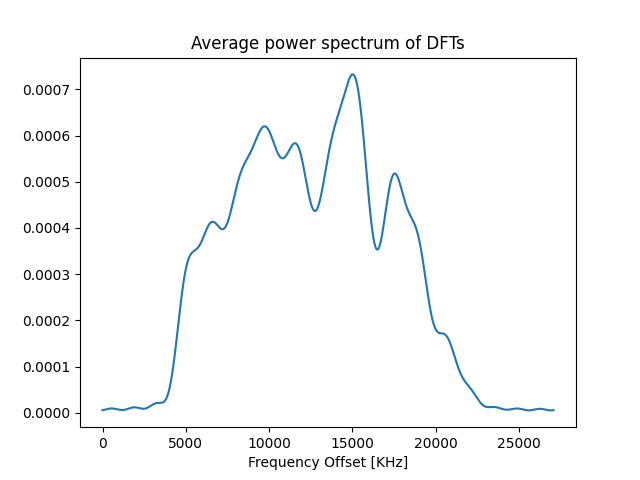
First, we will get the plot of the average power spectrum plot. Play with the code to increase the N value, and you can see the sharpness of the line.
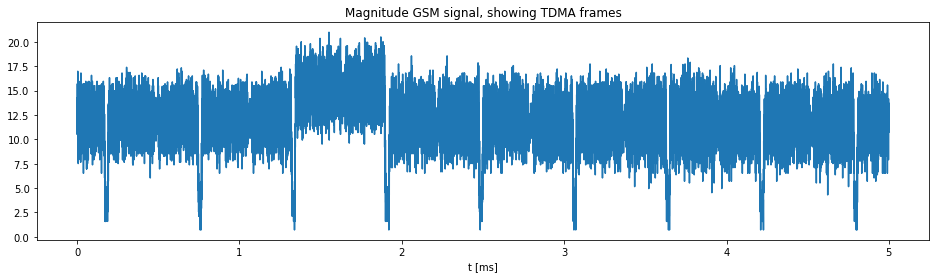
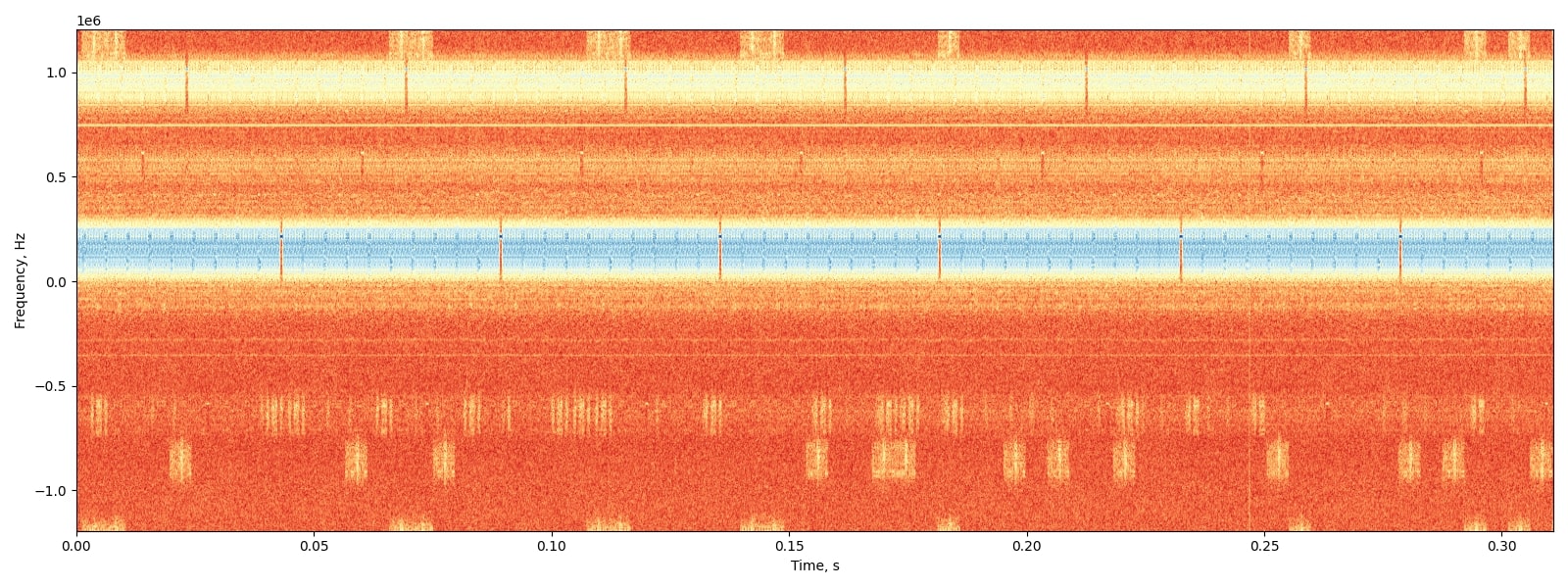
Further plots generated includes TDMA frames, the position of FCCH bursts visualisation as given below.
We can see the pure tone FCCH bursts are occurring at specific intervals and can be visualized as small blue dots at a range of 0.25 from the centre.
Thus implementation of a filter bank and calculating the positions of these FCCH bursts will give us the offset frequency since we know these FCCH bursts occur at a distance of 67708.3 Hz from the frequency centre.
The average power spectrum of Discrete Fourier Transforms
Usage
Test files for GSM, recorded by Andreas can be found here.
Setup the environment, make sure the requirements are installed (preferably in a virtualenv). Use the setup.py to install necessary requirements.
To view the parameters for input run ~$ python cali.py -h
optional arguments: -h, –help show this help message and exit -f F select path to input file -m {dab,dvbt,gsm} select mode -s {rtlsdr} scan with rtlsdr -c C scan by „all“ channels, by channel number „0,1,…n“ or by block name -rs RS file/scan sample rate -rg RG scan with gain -rd RD scan with the device -nsec NSEC scan for n-seconds -gr, –graph activate graphs -v, –verbose an optional argument -fc FC frequency centreSetup the environment, make sure the requirements are installed (preferably in a virtualenv). Use the setup.py to install necessary requirements.
If testing with a recorded wav file, enter the parameters as:
If testing with an SDR stick, specify the ARFCN band, or specific frequency centre to scan for the GSM channel.
The ARFCN Bands include: GSM_850, GSM_R_900, GSM_900, GSM_E_900, DCS_1800, PCS_1900. For more information about the arfcn, checkout here.
Example usage:
~$ python cali.py -m gsm -s rtlsdr -c 900
The above parameters can be changed according to user needs. -rs can be specified with sample rate. The exact sample rate will be shown with the result. Make sure the SDR is connected when running the code with -s rtlsdr argument. Specify the -fc frequency argument, if the scan is to be done with a single frequency.
The expected output would look like this:
{'f': None, 'm': 'gsm', 's': 'rtlsdr', 'c': '900', 'rs': 2048000, 'rg': 20, 'rd': 0, 'nsec': 10, 'graph': False, 'verbose': False, 'fc': None}
let's find your SDR's oscillator precision
scanning…
starting mode: gsm
Found Rafael Micro R820T/2 tuner
Exact sample rate is: 270833.002142 Hz
Scanning all GSM frequencies in band: GSM_900
Offset Frequency: 31031.66666666667
Offset in PPM: 33.179448397684716
The Offset calculated from the frequency drift between fcch positions can be precisely derived and can be used to correct the oscillator.
Potential further improvements:
LTE Signal support need to be included (currently in focus), and much more standards need to be made compatible for a wide usage of the tool.
Making a platform-neutral API to communicate with more SDR devices.
Optimising the user interface (command-line tool can be made more user friendly).
References:
Find out the project updates in my branch and do give a star for the project in AerospaceResearch org:
This project helps in calculating the frequency offset cause by heating of local oscillators of your SDR (Software Defined Radio) using some reference signals like DAB+, GSM, DVB-T, etc.
Hi everyone. I am writing this blog to share my work progress with everyone out there.
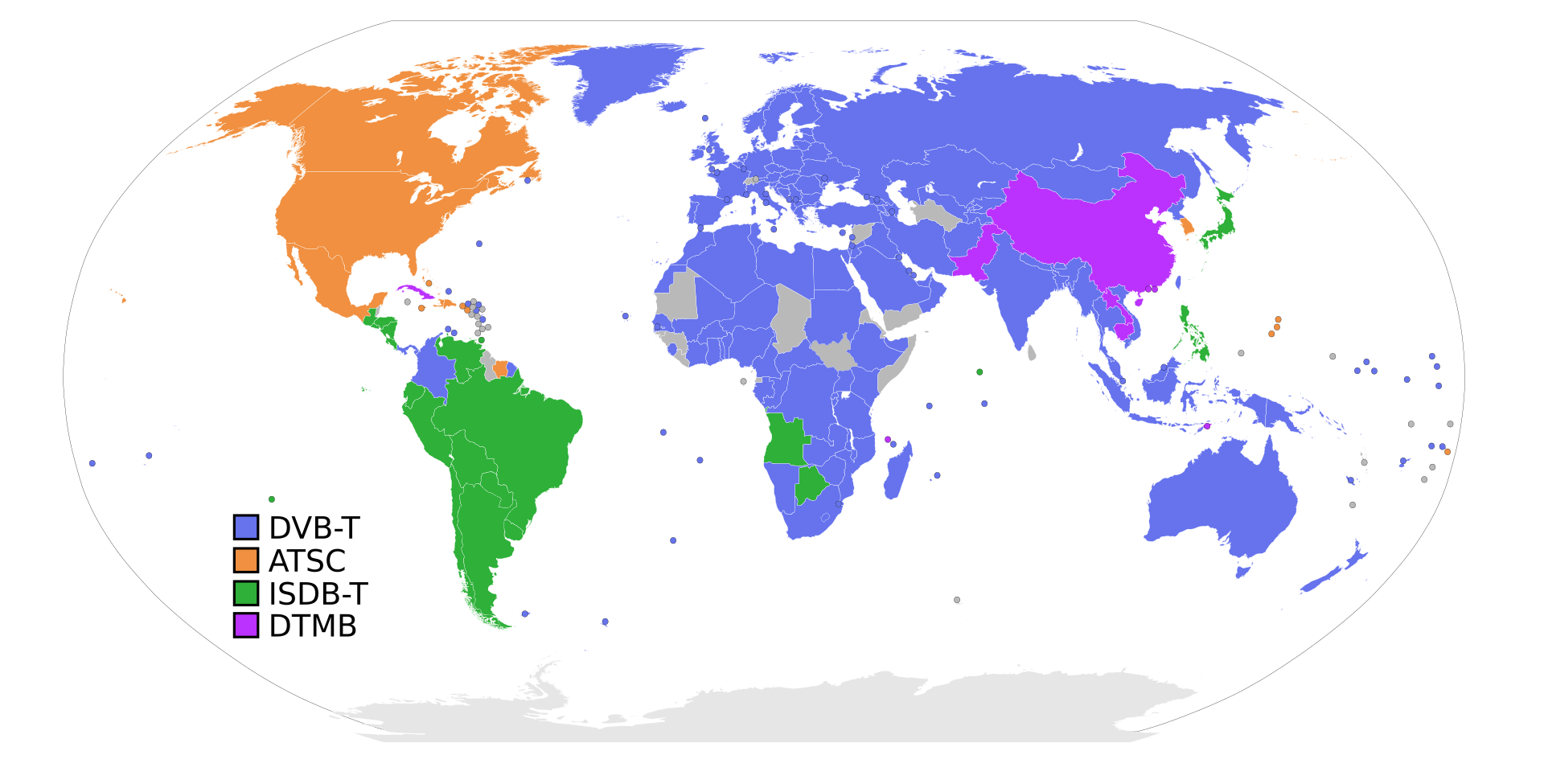
I have been working on extending the limitations in the Calibrate-SDR tool by adding support of DVB-T and DVB-T2 (terrestrial) signals. Because these signals are broadly used in Europe, Africa, Australia, and Asia region. So can be used here to provide calibration to more SDR users.
As many of you would have worked on some sort of SDRs, might have faced errors due to the Frequency Offset of the Device(due to Crystal oscillators heating).
So here we have a tool named Calibrate-SDR to save you from correcting frequency offset repetitively. Calibrate -SDR is based on the idea of synchronization of devices by a constant frequency part present in the signal. This tool currently uses DAB+ signals to calculate the PPM shifting in frequency. I am enhancing it by using the DVB-T signal for this purpose and try to help more people out there.
Further reading about initial Calibrate-SDR refer to this blog.
Some words of wisdom about DVB-T signal
DVB-T, short for Digital Video Broadcasting — Terrestrial, is the DVB European-based consortium standard for the broadcast transmission of digital terrestrial television that was first published in 1997[1] and first broadcast in Singapore in February 1998. This system transmits compressed digital audio, digital video, and other data in a MPEG transport stream, using coded orthogonal frequency-division multiplexing (COFDM or OFDM) modulation. It is also the format widely used worldwide (including North America) for Electronic News Gathering for transmission of video and audio from a mobile newsgathering vehicle to a central receive point.
Wikipedia
Thanks to Wikipedia for providing historical details about this signal.
Some Technical Details about signal.
Would suggest reading the technical standard for more detailed idea about it.
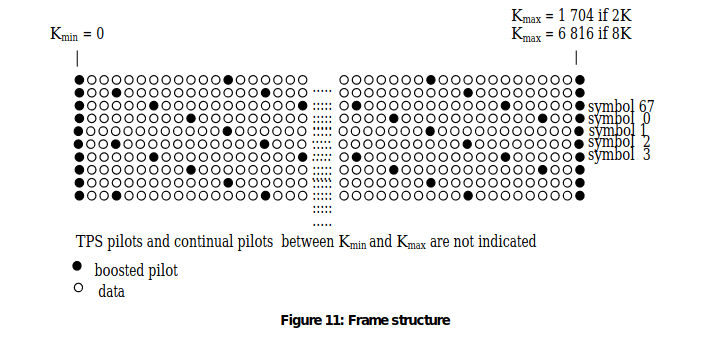
I would cover only the part that was of value for me. Going through this paper and some research. I found out that DVB-T signals have a constant part called pilot inside the ODFM frame structure of DVB-T.
Visit etsi.org for better image.
So in addition to the transmitted data an OFDM frame contains:
– scattered pilot cells;
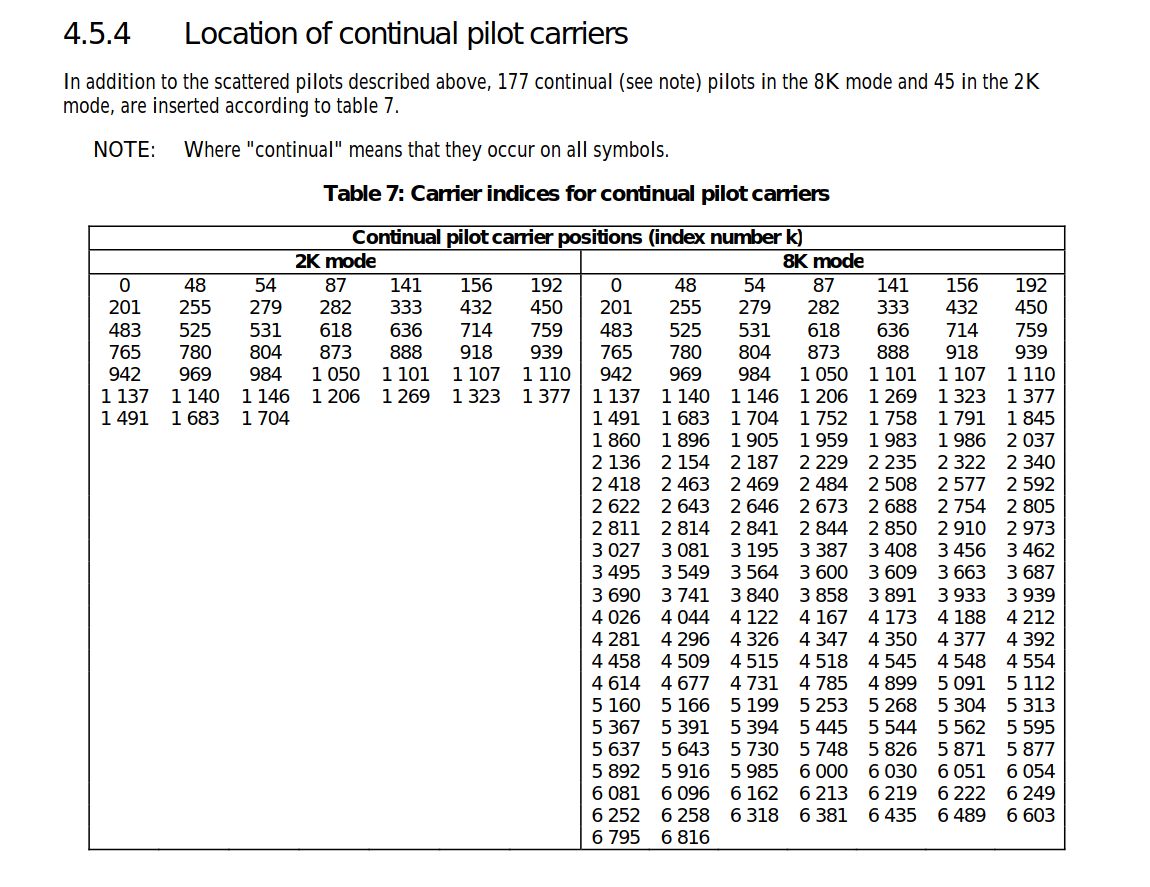
– continual pilot carriers;
– TPS carriers.
The modulation of all data cells is normalized so that E[c × c∗]= 1.
All cells which are continual or scattered pilots are transmitted at “boosted power level” so that for these E[c ×c∗] = 16/9.
The pilots can be used for frame synchronization, frequency synchronization, time synchronization, channel estimation, transmission mode identification and can also be used to follow the phase noise.
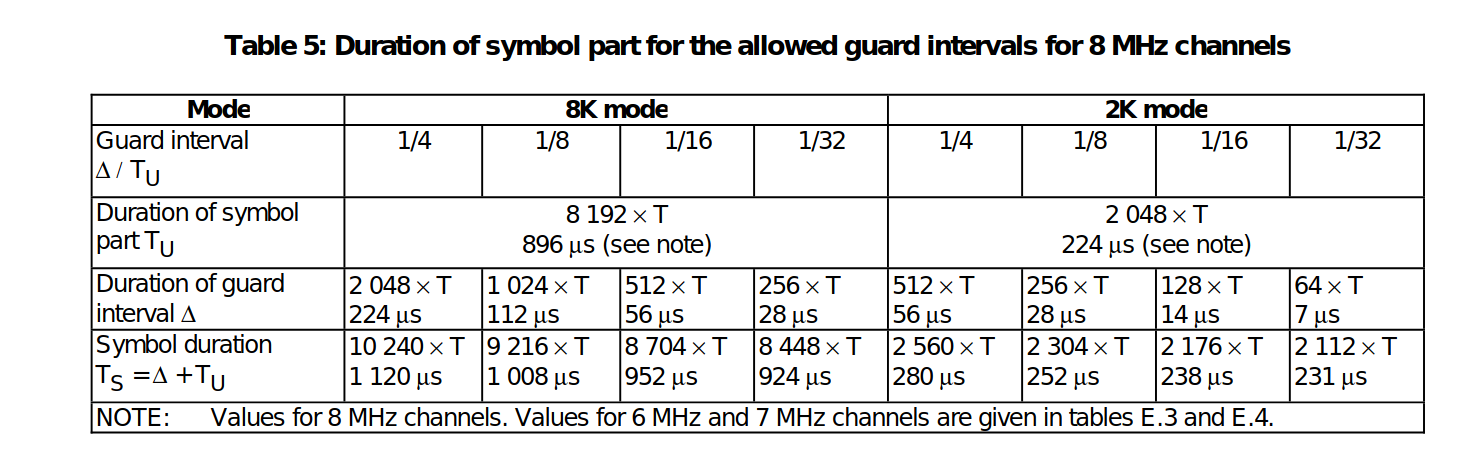
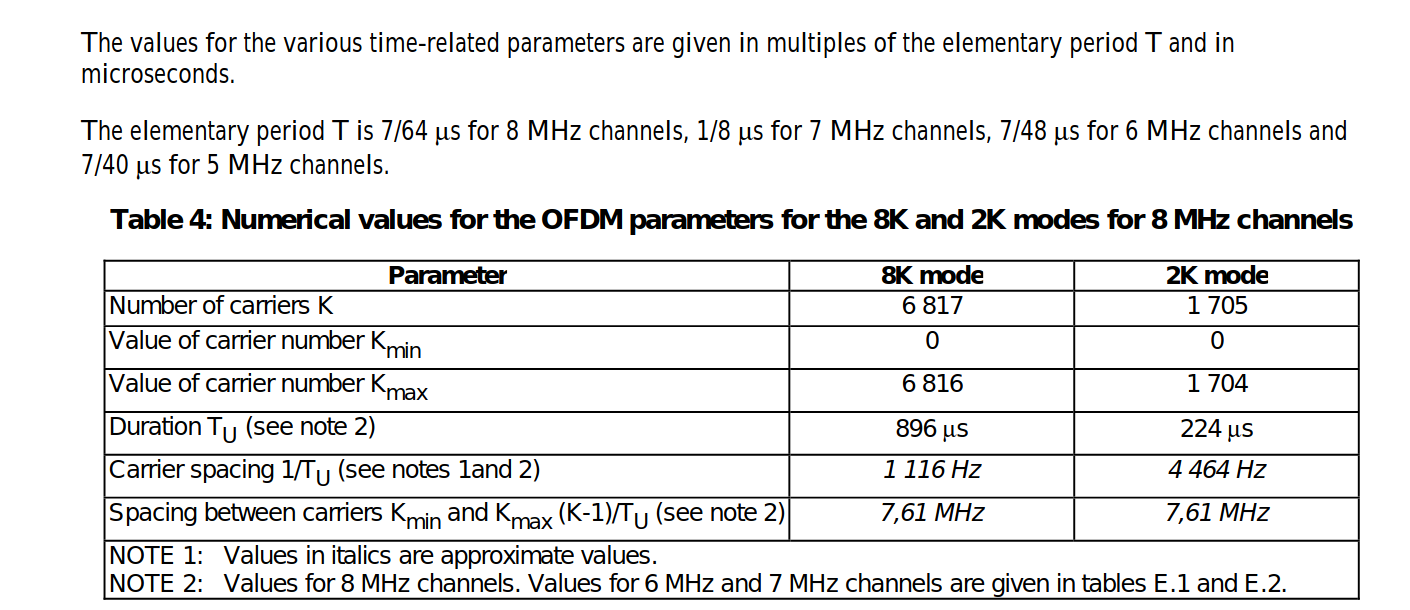
The carriers are determined by Kmin = 0 and Kmax = 1 704 in2K mode and 6 816 in 8K mode respectively. The spacing between adjacent carriers is 1/TU while the spacing between carriers Kmin and Kmax are determined by (K-1)/TU.
The numerical values for the OFDM parameters for the 8K and2K modes are given in tables for 8 MHz channels, for 6 MHz and 7 MHz channels.
We would collect some continual pilots and average them to get an overall current frequency. We would create an array of all the indexes of the continual pilot and use it.
Then we would subtract them with the known frequency of DVB-T. Hence, we would have the PPM shift. So that’s much of what we are doing for our tool.
It’s more interesting to work on once done with the boring Research work.
CalibrateSDR developed by AndreasHornig is working perfectly with signals DAB+. We can use the python program to calibrate SDR devices. As part of the Google Summer of Code, I have been working around GSM Signal Standard to make CalibrateSDR compatible with it.
Before moving on, please read the initialblog on using CalibrateSDR, written by our mentor. The primary focus of this project is to extend the applicability towards more signal standards, so as to make it helpful for the SDR community. As DAB+ is mainly used in Europe, Signal standards like GSM, LTE, NOAA-Weather Satellites (use their sync pulses within the data) can be used.
Currently, it uses the pyrtlsdr package, which makes it work with RTL-SDR. Piping the API to work with other SDRs will also make the project have a wide range of applications in the SDR Community.
My first weeks of coding relied generally on implementing GSM signals. Working with the GSM frequency correction channel to calculate the offset is my primary task.
Proposed final working of CalibrateSDR
Working of GSM to calibrate the SDRs
GSM uses time division to share a frequency channel among users. Each frequency is divided into blocks of time that are known as time-slots. There are 8 time-slots that are numbers TS0 – TS7. Each time slot lasts about 576.9 μs. The bit rate is 270.833 kb/s, a total of 156.25 bits can be transmitted in each slot.
Each slot allocates 8.25 of its „bits time“ as guard-time, split between the beginning and the end of each time slot. Data transmitted within each time slot is called a burst. There are several types of bursts.
„Frequency correction“ burst, which is a burst of a pure frequency tone at 1/4th the bitrate of GSM or (1625000 / 6) / 4 = 67708.3 Hz. By searching a channel for this pure tone, we can determine its clock offset by determining how far away from 67708.3Hz the received frequency is.
How is it working?
A more robust way is to implement a hybrid of the FFT and filter methods. We could use the adaptive filter as described in the paper: G. Narendra Varma, Usha Sahu, G. Prabhu Charan, Robust Frequency Burst Detection Algorithm for GSM/GPRS (https://ieeexplore.ieee.org/document/1404796)
After finding the position of FCCH bursts that we receive in SDRs, it will be easy to calculate the offset. We measure it by how much shifted is the FCCH burst, than what we expect, that is at 67708.3 Hz from the frequency centre. Simply, if no offset is there, we could see these tone bursts at 67708.3 Hz offset with respect to the centre frequency of the channel.
I have completed the program to output the channel frequencies from the given ARFCN numbers of GSM. Check the code for the same here.
Detect and visualize the FCCH bursts!
Currently, the program has been tested only with IQ Wav file recordings. Even though the code has been designed to work with RTLSDR sticks, it is not tested yet with a live connection. Find the link to test files here.
After cloning the repo locally, run the setup to install the requirements using the command: python setup.py install
First, we will get the plot of the average power spectrum plot. Play with the code to increase the N value, and you can see the sharpness of the line.
The figure above shows the TDMA frames generated by the GSM Signal.
To determine the FCCH bursts from the signal, plot the spectrogram, using the function present in gsm.py. The spectrogram_plot function will do the fft and outputs the figure.
The generated FCCH bursts detection can be visualized as shown below:
We can see the pure tone FCCH bursts are occurring at specific intervals and can be visualized as small blue dots at a range of 0.25 from the centre.
Thus implementation of a filter bank and calculating the positions of these FCCH bursts will give us the offset frequency since we know these FCCH bursts occur at a distance of 67708.3 Hz from the frequency centre.
Will update the code after testing with gsm channels, and the function to calculate the final frequency offset will be committed to the repo.
The workarounds for the second coding period are implementation of LTE and NWS as well as the bridging of a more generalised SDR API, SoapySDR API, which has Python bindings to use as well.
Because of the recent sharp growth of the satellite industry, it is necessary to have free, accessible, open-source software to analyze satellite signals and track them. To achieve that, as one of the most essential steps, those applications must calculate the exact centers of the input satellite signals in the frequency domain. My project is initiated to accommodate this requirement. It aims to provide a program that can reliably detect satellite signals and find their exact frequency centers with high precision, thus providing important signal analysis and satellite tracking statistics.
Overview
The project aims to locate the exact centers of given satellite signals with the desired accuracy of 1kHz, based on several different methods of finding the center. At first, the center-of-mass approach will be used to determine the rough location of the center. More algorithms will be applied from that location depending on the type of the signal to find the signal center with higher accuracy.
Currently, for many NOAA signals, with the center-of-mass and “signal peak finding” approach (that will be shown below), we can get results with standard errors less than 1 kHz. For example, with the following signal, the standard error is 0.00378 kHz.
Theoretical basis
The overall flowchart
Fast-Fourier Transform (FFT)
Fourier Transform is a well-known algorithm to transform a signal from the time domain into the frequency domain. It extracts all the frequencies and their contributions to the total actual signal. More information could be found at Discrete Fourier transform.
Fast-Fourier Transform is Fourier Transform but uses intelligent ways to reduce the time complexity, thus reducing the time it takes to transform the signal.
Noise reduction and background signal reset
There is always noise in actual signals, but generally, noise has two important characteristics: normally distributed and its amplitude does not change much by frequency. You can see the signal noise in the following figure:
If we can divide the signal in the frequency domain into many parts such that we are sure that at least one of them contains only noise, we can use that part to determine the strength of the noise.
For example, consider only this signal segment:
By taking its average, we can find where the noise is located relative to the amplitude 0. By subtracting the whole signal to this average, we can ensure the noise all lies around the zero amplitude.
Next, we want to reduce all the noise to zero. To do that, we consider the distribution of noise, which is a normal distribution.
From this distribution, we are sure that 99.9% of noise has an amplitude less than three times the noise standard deviation. If we shift the whole signal down by 3 times this standard deviation, 99.9% of the noise will have amplitude less than 0.
From there, we can just remove every part of the signal with an amplitude less than zero. Then we will be able to get a signal without noise with the background having been reset to 0.
You can clearly see the effect of this algorithm by looking at the signal of PIXL1 satellite above, where all the noise has been shifted to below 0.
Center-of-mass centering
This algorithm is simple, the centroid position is calculated as (sum of (amplitude x position)) / (sum of amplitude), similar to how we calculate the center of mass in physics. The result of this algorithm is called the spectral centroid, more information could be found at Spectral centroid.
Peak finding.
For signals with clear peaks such as APT(NOAA), finding the exact central peak points of the signal would give us good results. From the rough location of the center by the Center-of-mass method, we can scan for its neighbor to find the maximum peak. This peak will be the center of the signal that we want to find.
For APT signals, this peak is very narrow, therefore this method is able to give us very high precision.
Predicted signal centers from TLE
TLE (Two-line element set) information of a satellite can be used to determine the position and velocity of that satellite in the orbit. By using this data of position and velocity, we can calculate the relativistic Doppler effect caused by the location and movement of the satellite to calculate the signal frequency that we expect to receive on the ground.
Error calculation.
Assume TLE gives us the correct result of signal center, we can calculate the standard error of the result by calculating the standard deviation:
Where n is the number of samples, x_i is the difference between our calculated center frequency from .wav and the frequency we get from TLE.
main.py is where initial parameters are stored. The program is executed when this file is run.
tracker.py stores the Signal object, which is the python object that stores every information about a signal and the functions to find its center.
tools.py contains the functions necessary for our calculation and the TLE object used for center prediction.
signal_io.py stores functions and objects related to the input and output of our signal.
Current results: For APT(NOAA):
Standard error = 0.00378 kHz
Usage instruction:
Create a folder with the name of your choice in the ‘findsat’ folder, for example, ‘data’.
Put the .wav file of your signal in this folder with any name.
Put a satellite.tle file in the folder containing the TLE of your satellite.
Put a station.txt file in the folder containing the name and location of the ground station where you recorded the signal separated by a “=”, for example (The numbers should be in degrees and meters):
Change the content of main.py as instructed in the code, then run main.py. The result will be put in your ‘data’ folder.
name = Stuttgart
long = 9.2356
lat = 48.777
alt = 200.0
Example of station.txt
Future improvements
Enable running the program directly from the command line instead of opening a python file before running.
Add more methods to find the signal centers for other signal types.
Demonstration of the code. This type of video consumes too much memory therefore it is not used anymore, but this function could be reintroduced in the future.
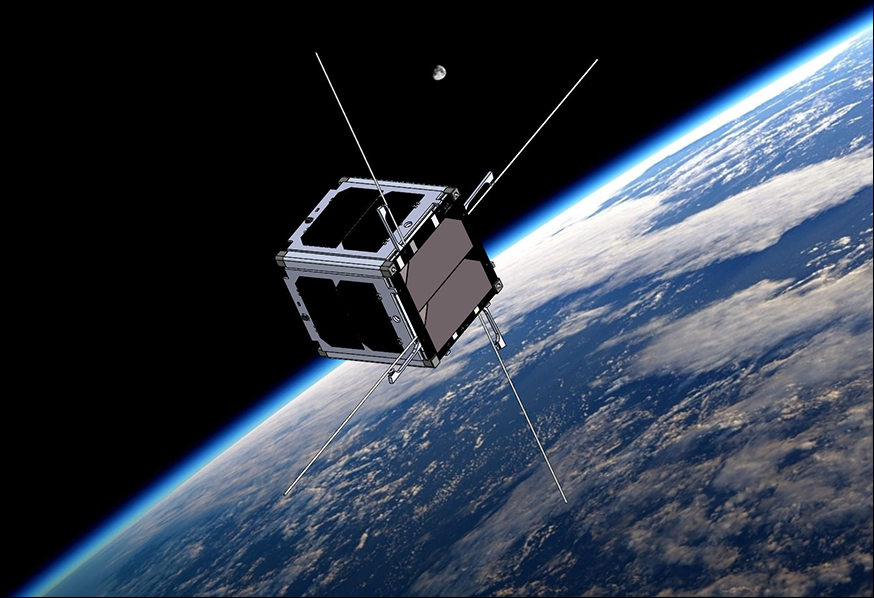
It consists of a modular cube of 10x10x10 cm with a mass of 1.33 kg, which is known as 1-unit (1U) CubeSat.
Cubesats were created to provide a low-cost, flexible and quick-build alternative to reach the space, in a few words a cubesat is a satellite with a cubic form.
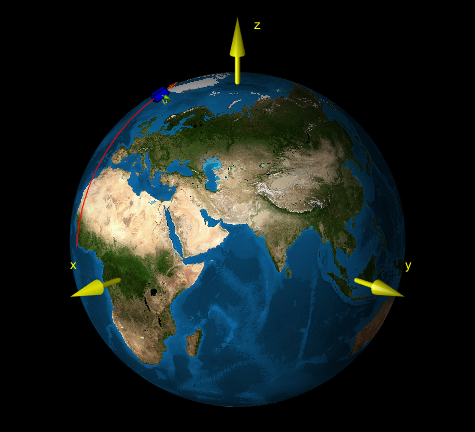
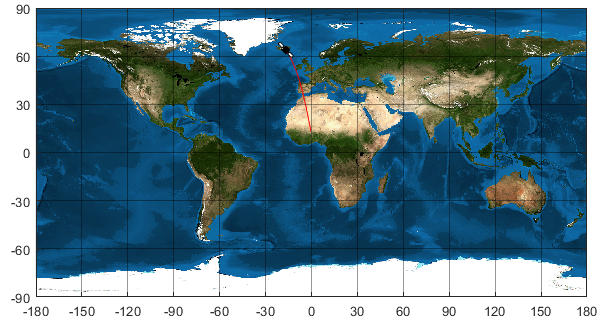
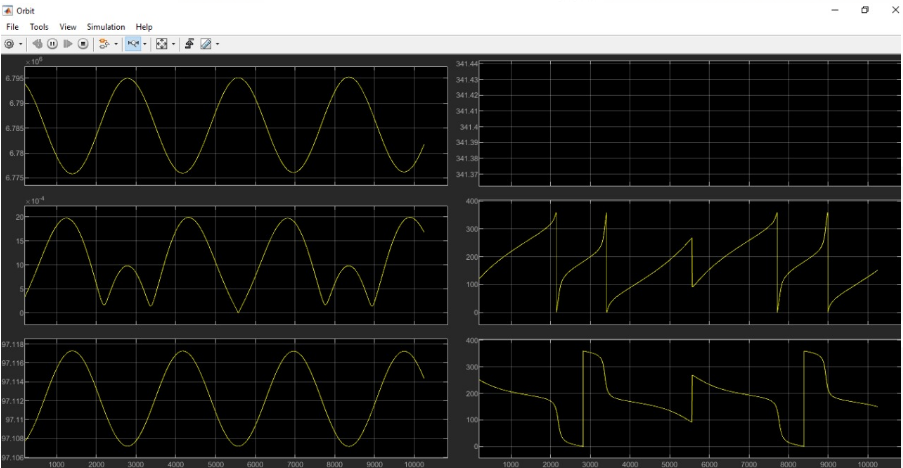
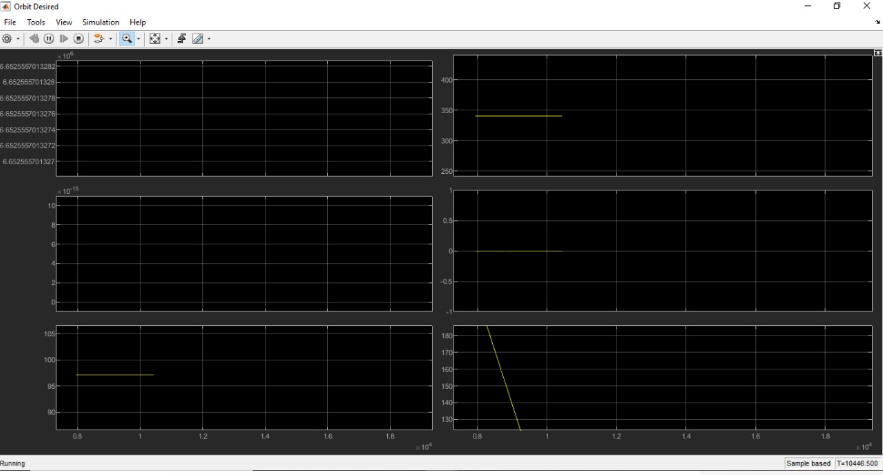
Cubesat are now affordable tools for teaching and researching for Universities and Research Centers. Although they are simple platforms, their complexity can be increased. Simulation of the capability of these subsystems is the first step to assess the convenience to include such subsystems in a platform.In this case, Implementation of sensor and actuator models in a CubeSat Simulator and visualization.
Software and hardware specifications and parameters:
The parameters were selected by Javier Sanz Lobo in his master thesis “ Design of a Failure Detection Isolation and Recovery System for Cubesats“
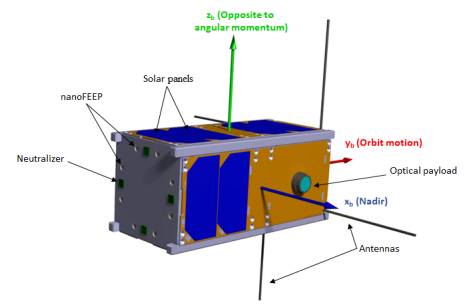
LEO ( Low earth orbit) was selected by its highly demanding orbit maintenance and pointing accuracy. The satellite selected to perform is a 2U CubeSat. Therefore, its size is 10x20x10 cm, and it weights 2.66 kg. The image illustrates the relative position of the main elements with respect to the body axis, the Earth and the orbit motion. The propulsion system was placed in the opposite face to the orbit motion to counteract the drag and the optical payload pointing to nadir(a selected face to always be syncronized to Earth).
Example proposed in master thesis:
Internally and intrinsically how does the software work?
Attitude and Orbital Control System Elements included for calculations summary
It was one of the best experiences I have had, talking and working with leaders in the technology, computer and aerospace industry has given me a lot of feedback. Let’s start from the beginning, I do not remember how I found the call by chance scrolling on the internet in leisure time, it caught my attention a lot, but I thought it would be very difficult to enter, then I saw that there were only two days left to apply to what I put my hands on the work, I took a bit of each project that I had already worked on and uploaded my proposal, a few weeks later I realized that it had been accepted and I was inside, I couldn’t believe it since it was a very hasty proposal.
The person in charge of aerospaceresearch contacted us in the following days, always very kind and cordial, when he invited us to the zulip group, I realized that there were many applicants with incredible ideas who have planned their projects months in advance and failed to enter, that was what made me think it would be even more difficult than I thought, but I was up for the challenge.
We started working and the weeks went by while I was still at the university, sometimes I didn’t have time for anything since I had to do a lot of research for what we would implement in the gsoc.
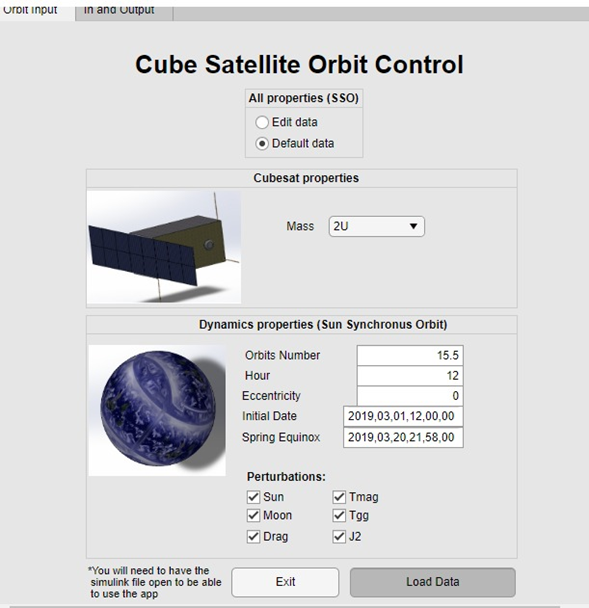
Initially the idea and what I was selected for was to implement sensors and actuators in a software for cubesat, which would be my surprise that the final turn was completely different, we went through that idea to a virtual reality simulator for the results of the software, weeks passed and I began to make the models, it was very difficult since I had never entered this area, nor had I ever used Matlab, after several meetings, we realized that it would not be the best implementation to the software, since if it counted with a display environment, although simple, useful. Finally, and after several ideas, the end was to create an interface, an application, user-friendly software to use the program in Matlab, since its use was really complex, even for certain experienced aerospace engineers, the thesis had to be read and spend several days to understand how the software worked and how to edit it, how to edit the input data.
Within the program, there were several files in Matlab and others in simulink, approximately 80 in total, with editable and non-editable data, it was a huge challenge.
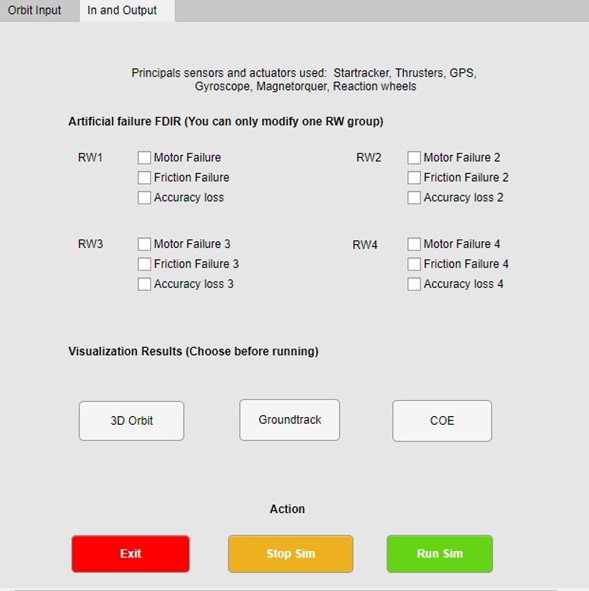
There were many preliminary ideas of how the interface would be, what would be modifiable and how it would be done without affecting the code, initially with physical properties of the cubesat, dynamic properties of the orbit, among others; the approach was good, but after making all this data editable, Matlab flagged hundreds of errors, we had a good idea but we weren’t executing it in the best way, instead of letting the user modify the mass at desired, we agreed on do it in cubesat units from 1 to 27, since to control the centers of mass it has to be geometrically distributed and it cannot be a random mass, I did not know that until my expert mentor on the subject told me about it. After that, there were many problems about the execution of data that did not enter the workspace correctly, they entered as strings instead of arrays, horizontal instead of vertical. The biggest challenge was always to send the data and return it, without the software marking an error, the part of displaying the results was the last challenge, since it was necessary to activate and deactivate blocks in simulink, for which many had to be created iterative cycles with codes.
Summary improvements:
The work achieved in the GSOC was brutal, with incredible results, the graphic interface was a success, and from a complex program that only the creator understood, an interface was achieved that would allow the user to edit the data and apply it to different scenarios that they may interest you or arise in their trajectories, the application runs directly from the app designer and you do not have to guess which files you have to preload for it to work, there is also the part of default data that allows you to see how the pre-established case is and understand how it works. Enter the data, now, you do not have to enter to edit or Matlab or simulink to comment, uncomment, edit, and change everything, everything is executed only from the app designer, allowing the user to create an infinite number of cases and applications than before, they could not and adjust it to any needs.
https://github.com/msanrivo/SmallSat_FDIR/pull/4
Future work:
Perfection is never achieved, there are always things that can be improved, in this case, there are still certain limitations not only in the base software but in the interface created, one of them is to export all the code to an application or open source code, so that it is open to all public and not only for people with a Matlab license. Also to this, one of the limitations is that when running the program, there are certain data in the simulink that are saved and the second time when using it, in order to erase these data from the previous execution, they have to be erased only by closing and opening the simulink file, which can be a bit tedious, in the Matlab workspace part this is solved. Another limitation is that you have to have the simulink file open to be able to run the app, although you should not edit anything to the simulink, just have it open. Finally, the interface with the user can always be improved, with the passage of time and the comments that are received, I will be able to improve the order of the interface to make it even easier to use.

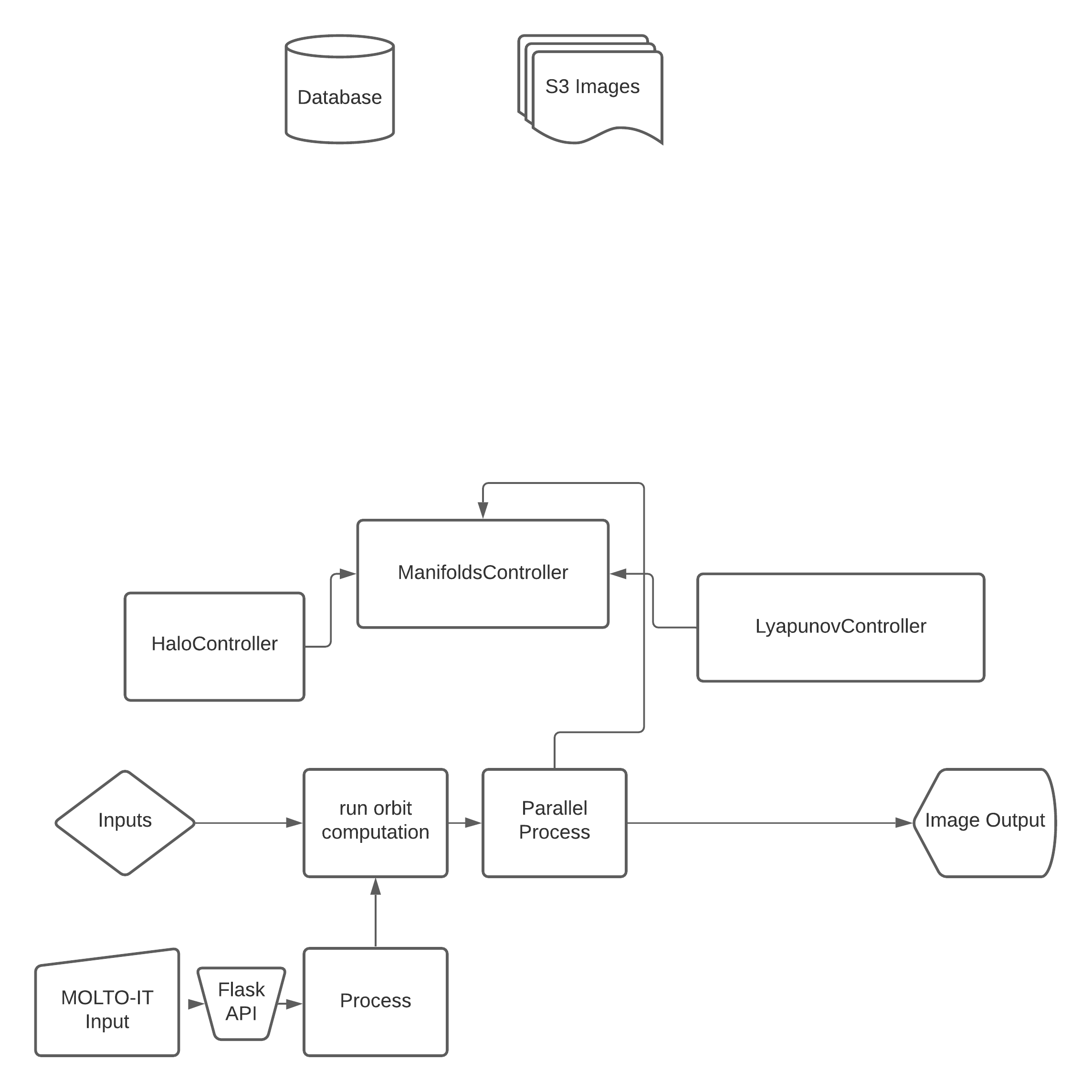
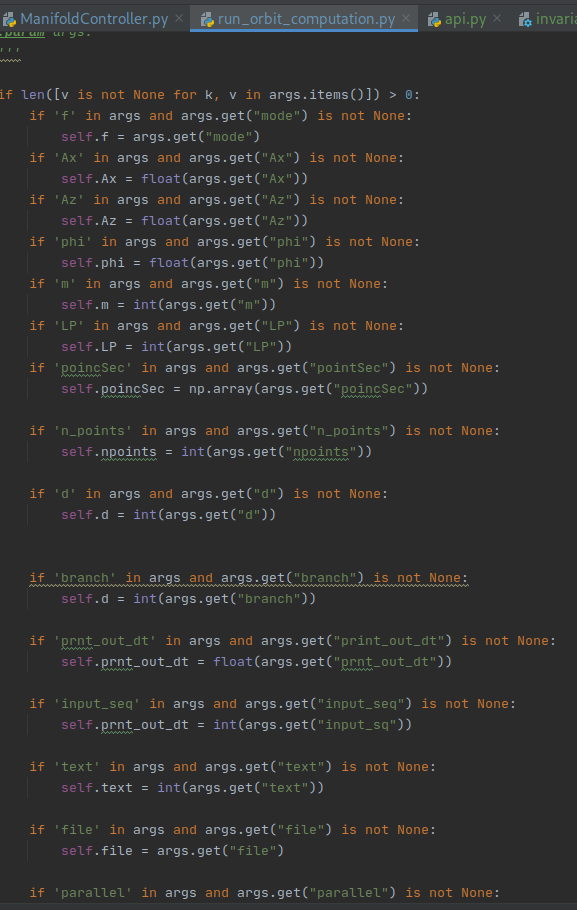
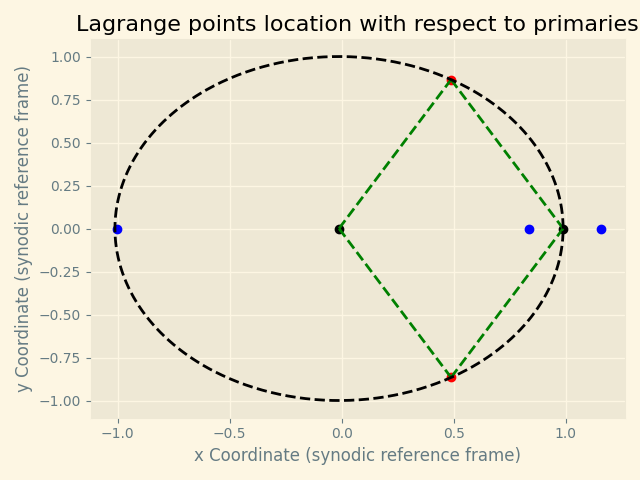
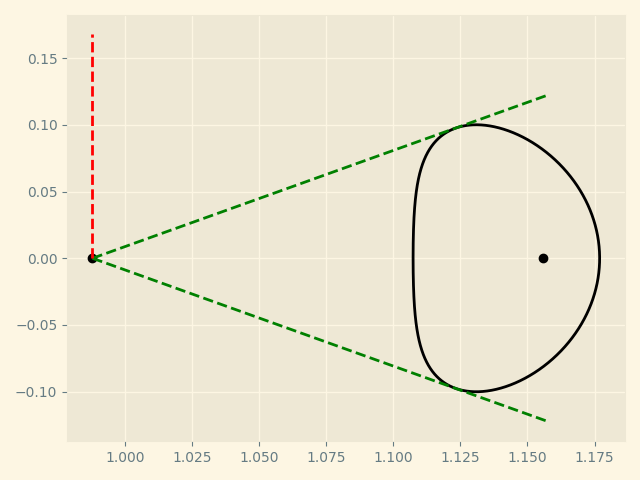
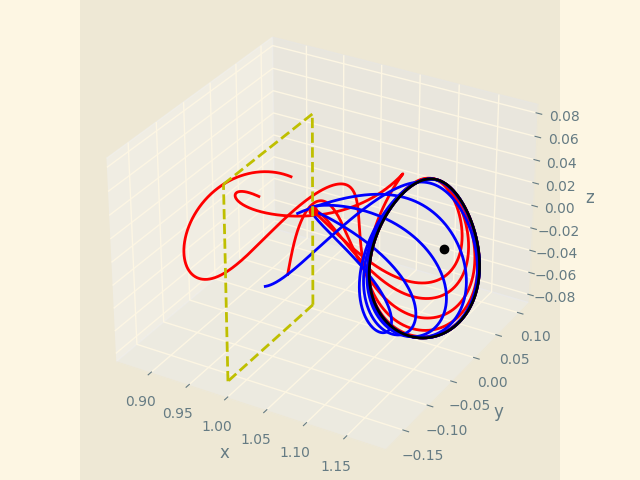
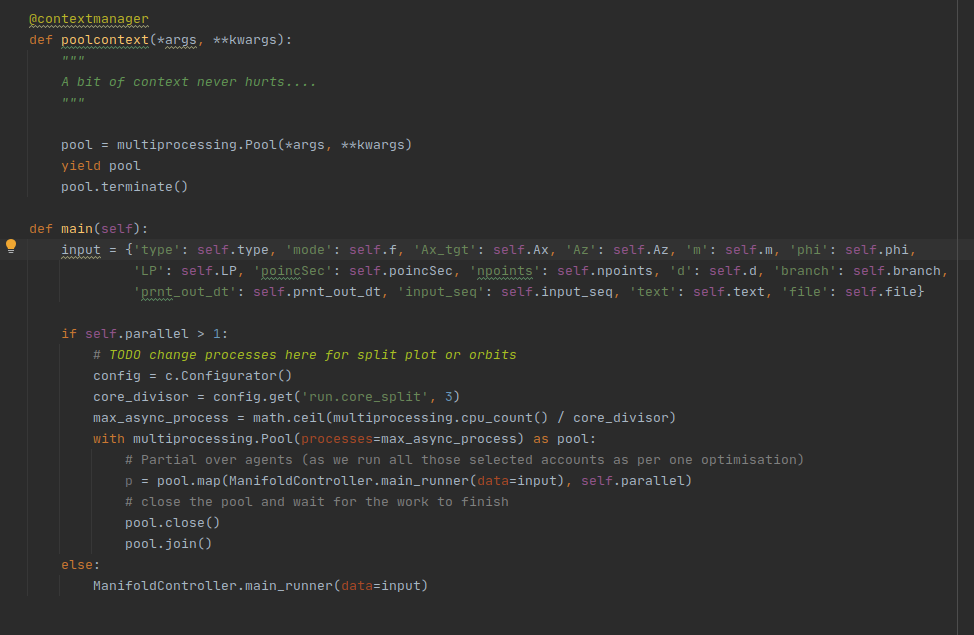
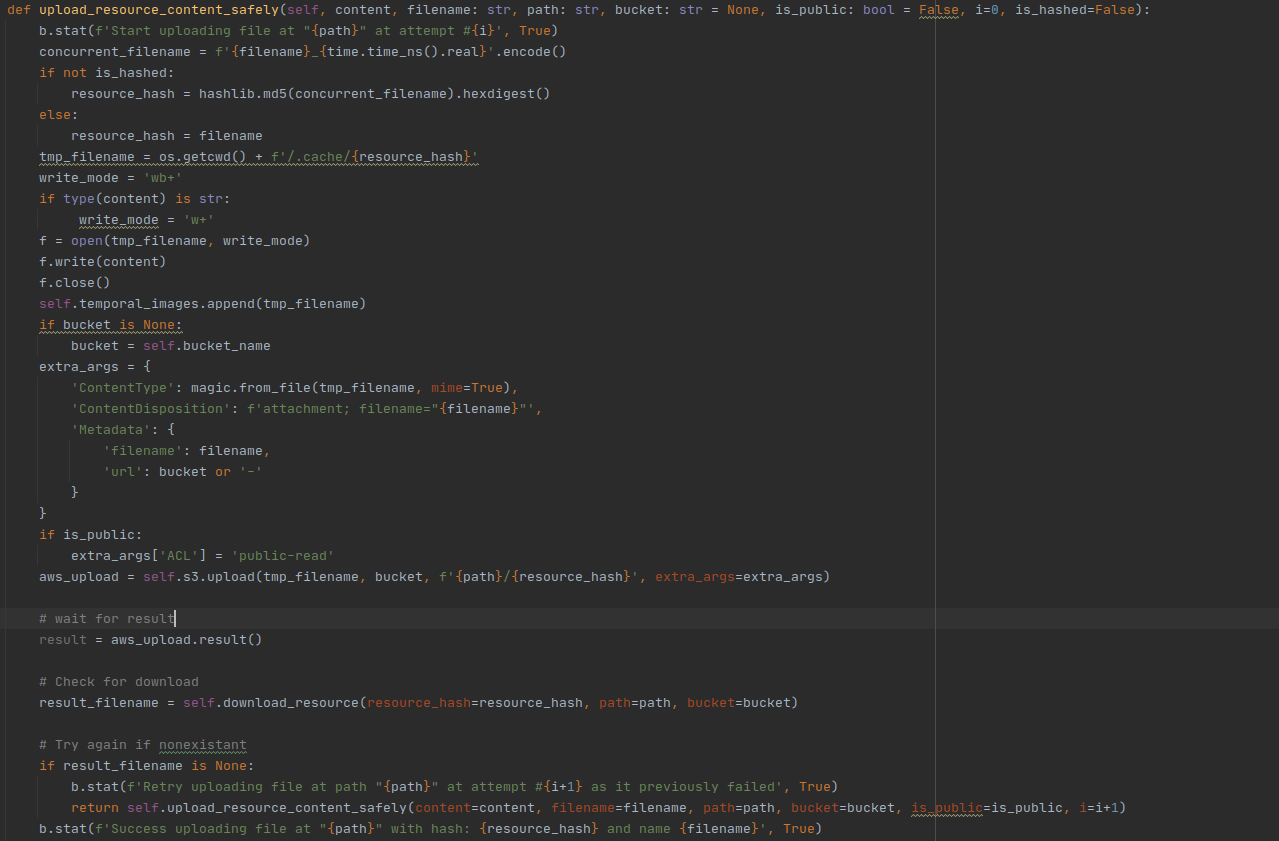
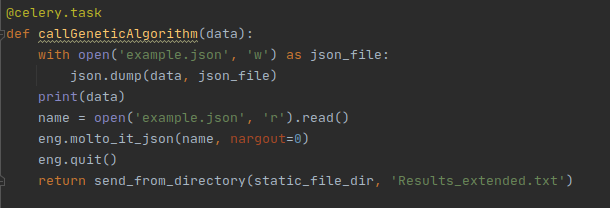
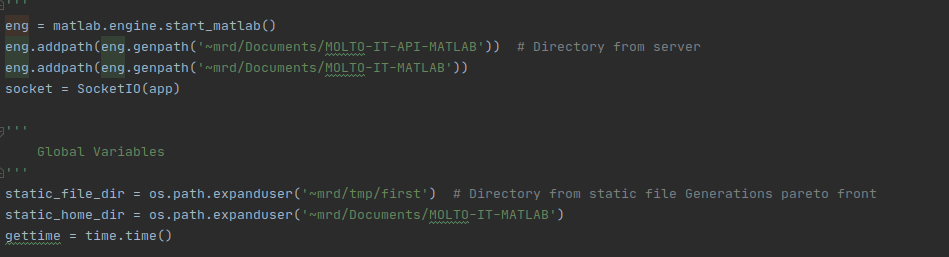
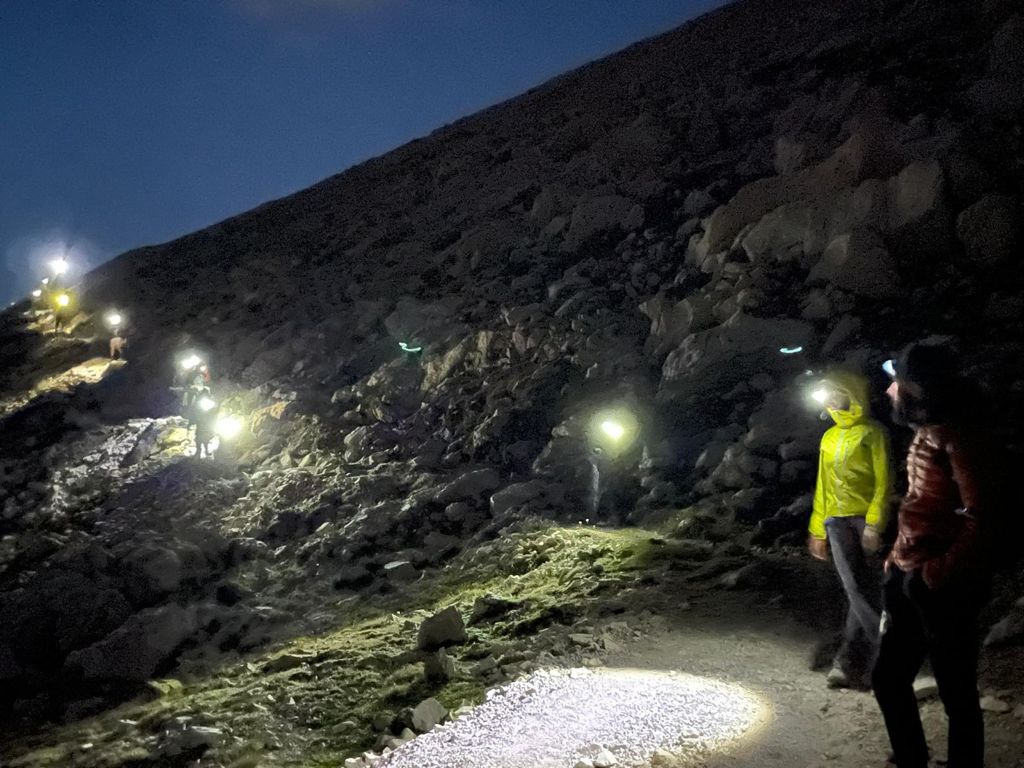
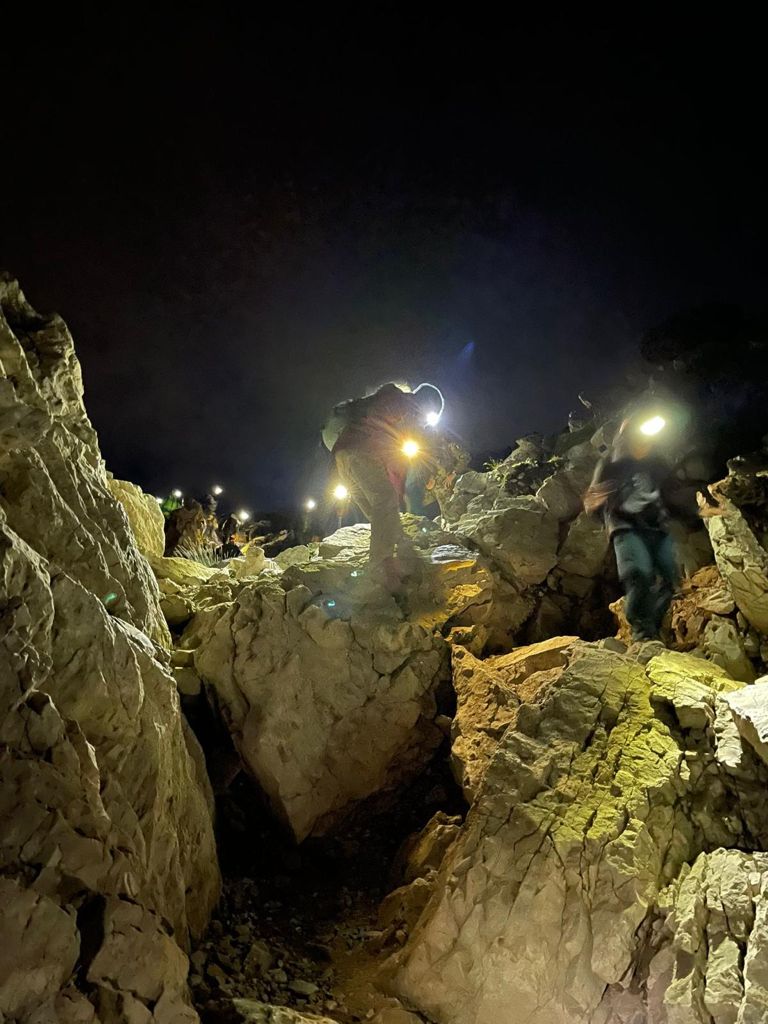
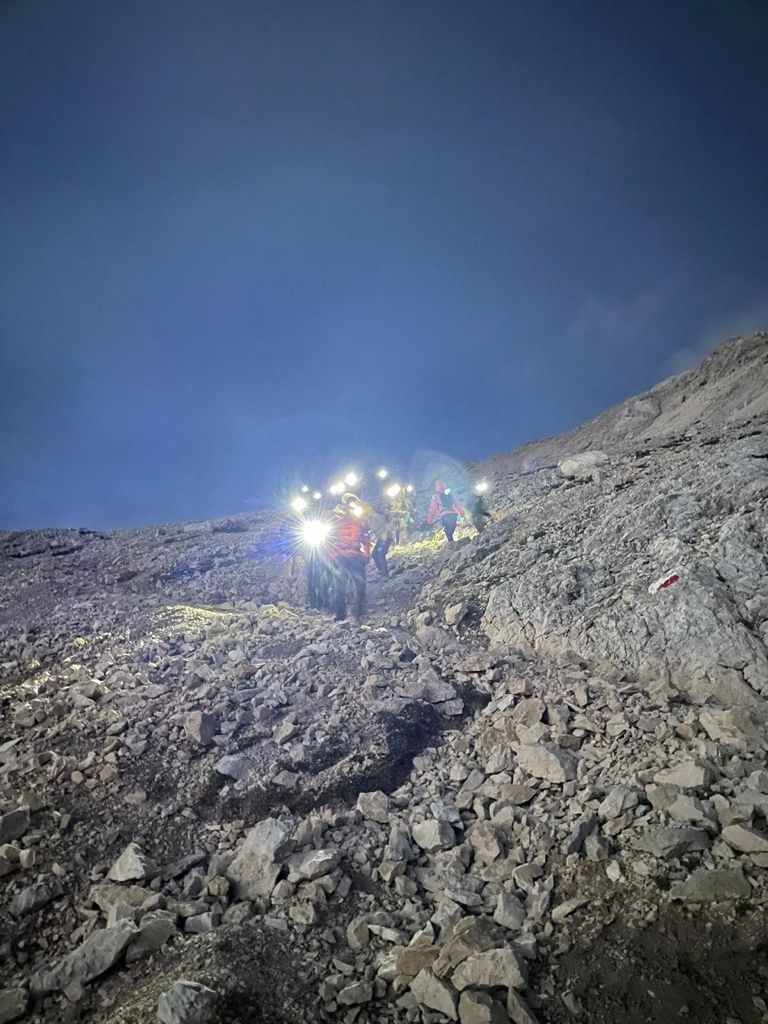
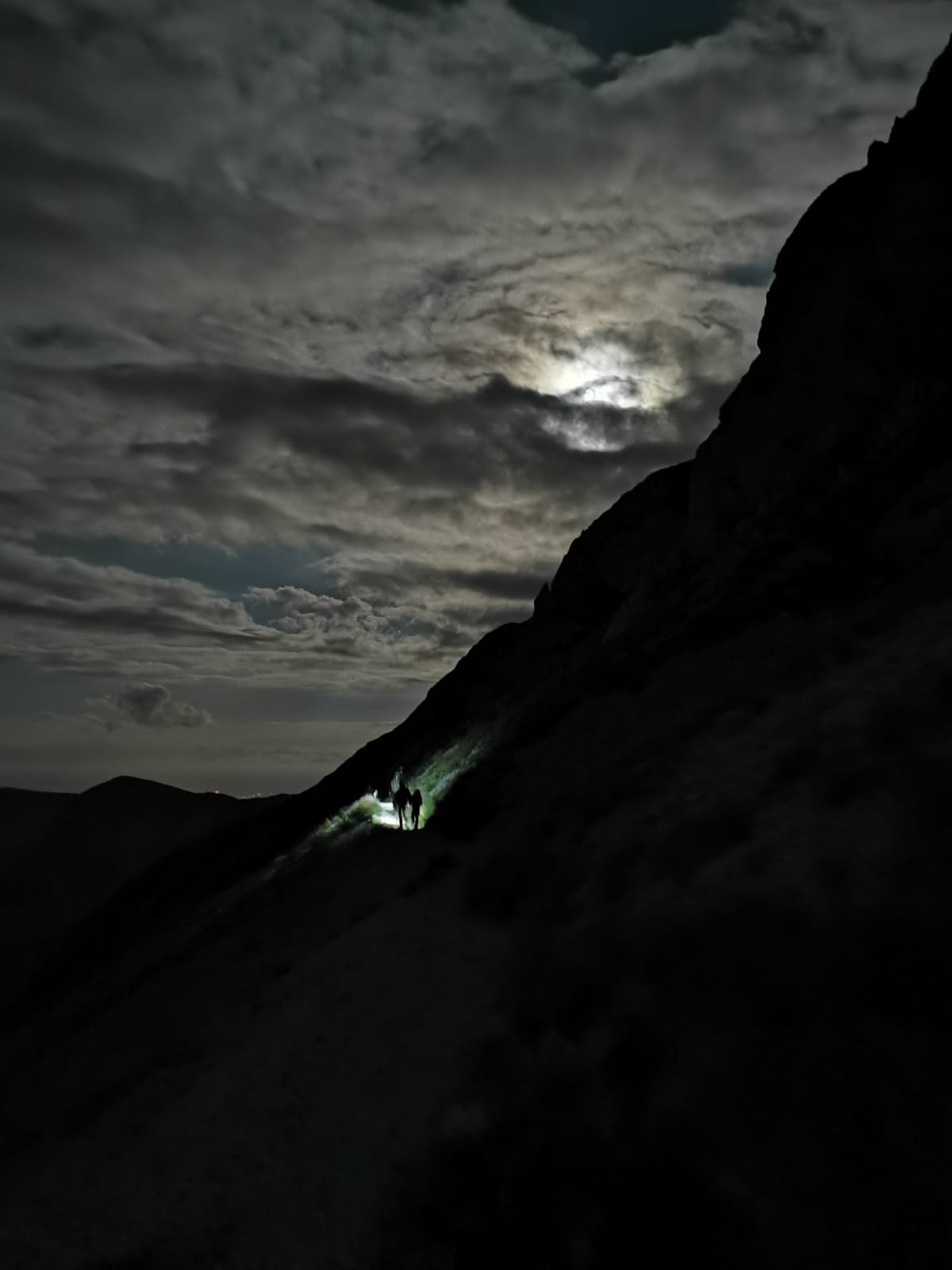
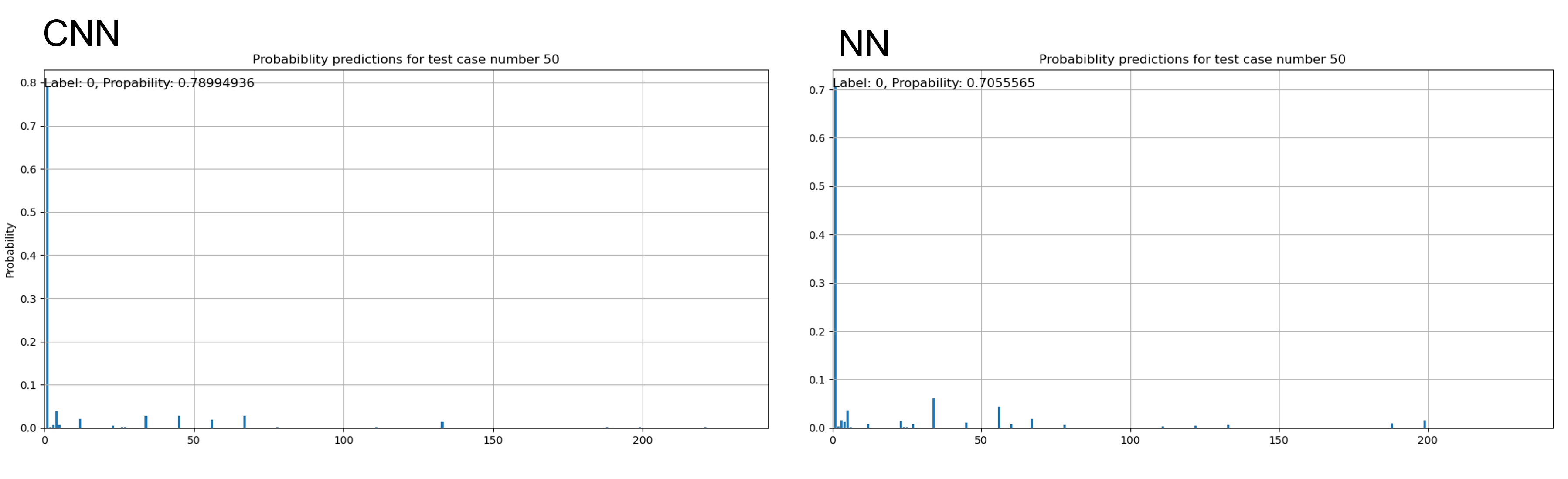
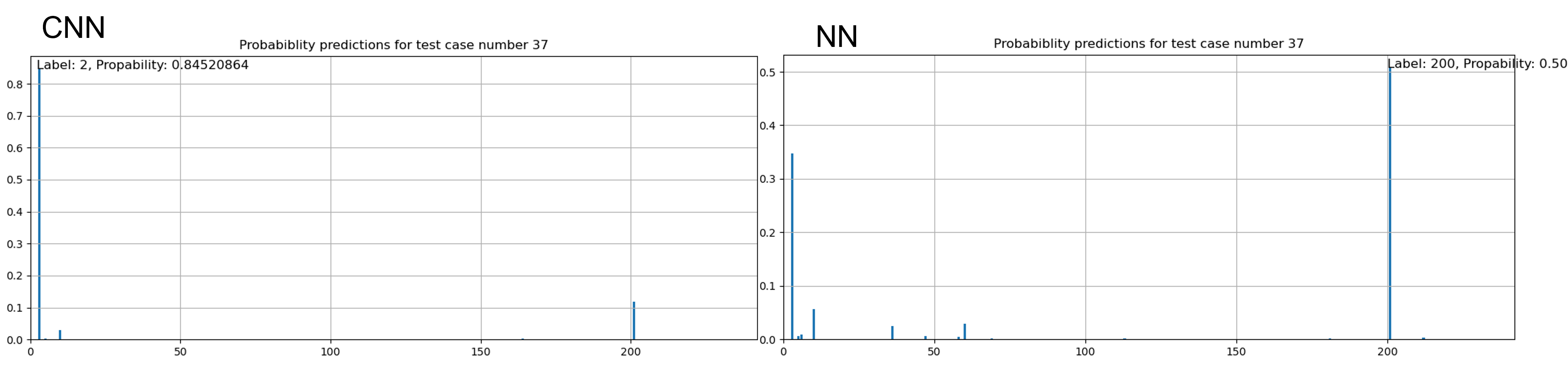
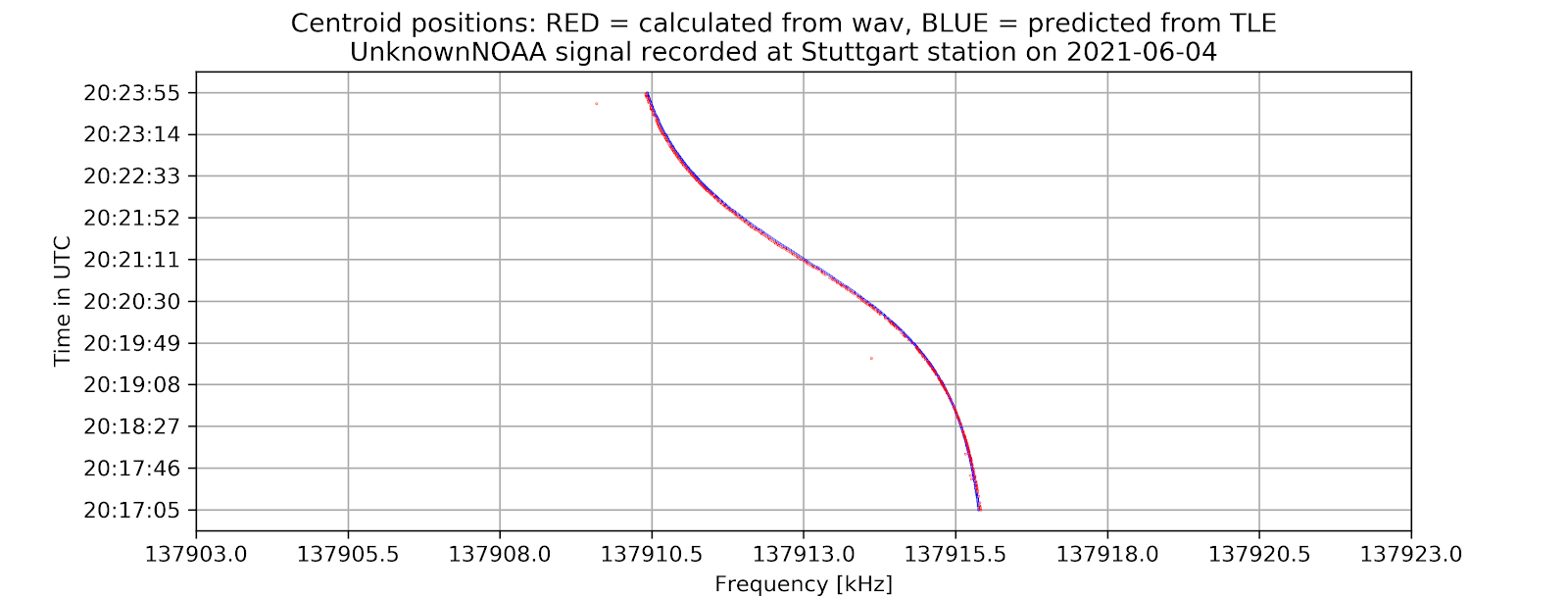
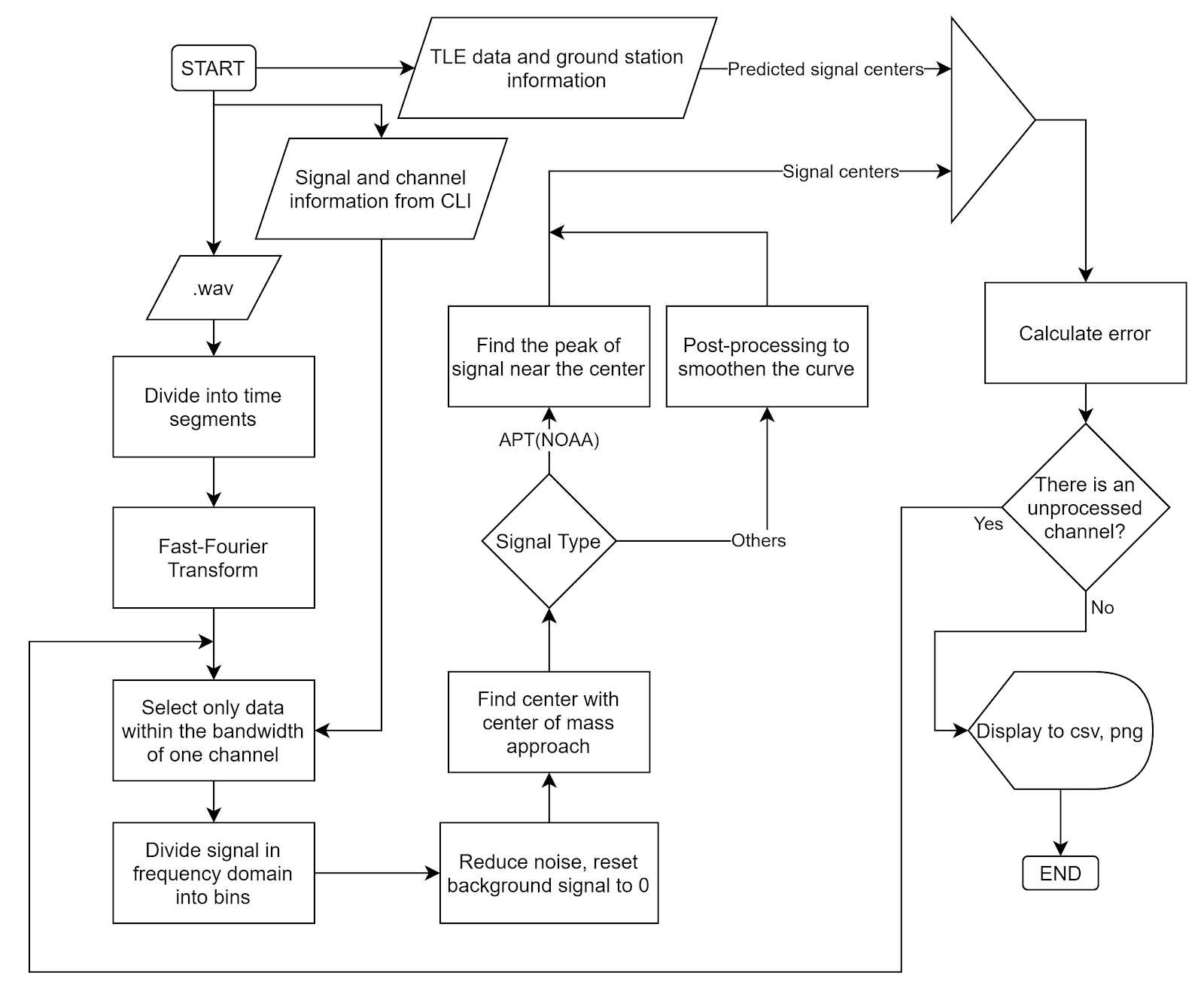
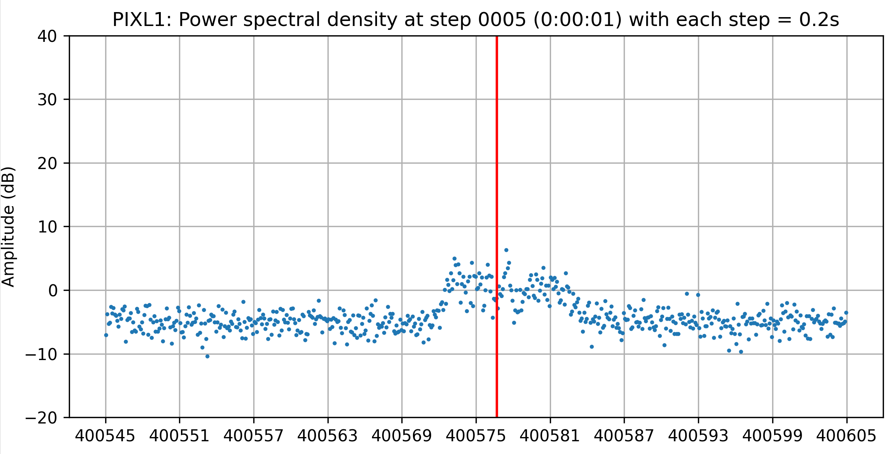

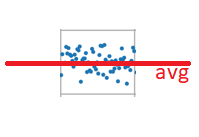
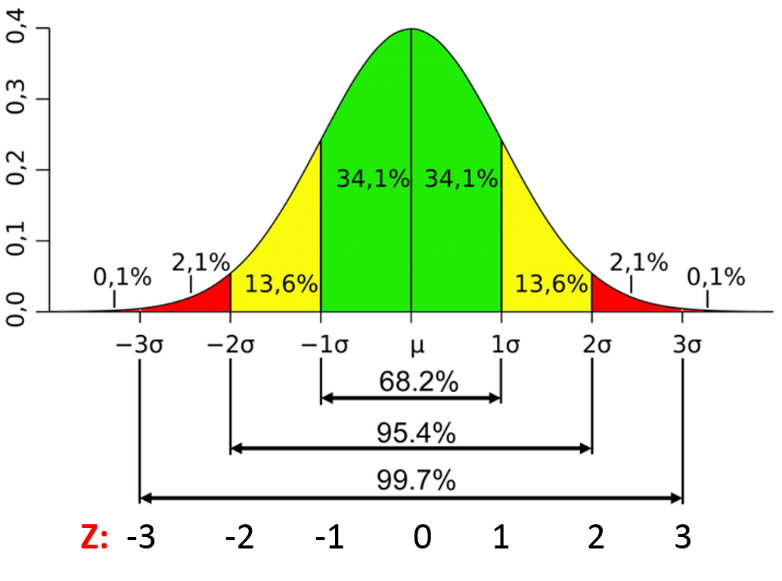 Photo from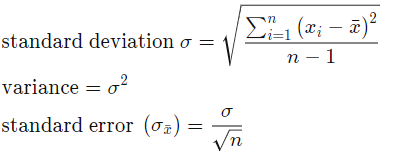
![[GSoC2021] CalibrateSDR GSM Support](https://aerospaceresearch.net/wp-content/uploads/2021/07/CalibrateSDR-1.png)


![[GSoC2021] CalibrateSDR GSM Support – first coding period](https://aerospaceresearch.net/wp-content/uploads/2021/06/CalibrateSDR-1.png)